// 2026-08-05 · Entertainment & Fun · by Bob Smith
Caps-a-holic: Which Blu-ray Release Actually Looks Best
Caps-a-holic puts screenshots from different Blu-ray, 4K and DVD releases of the same film side by side, so you can see exactly which transfer is worth buying.
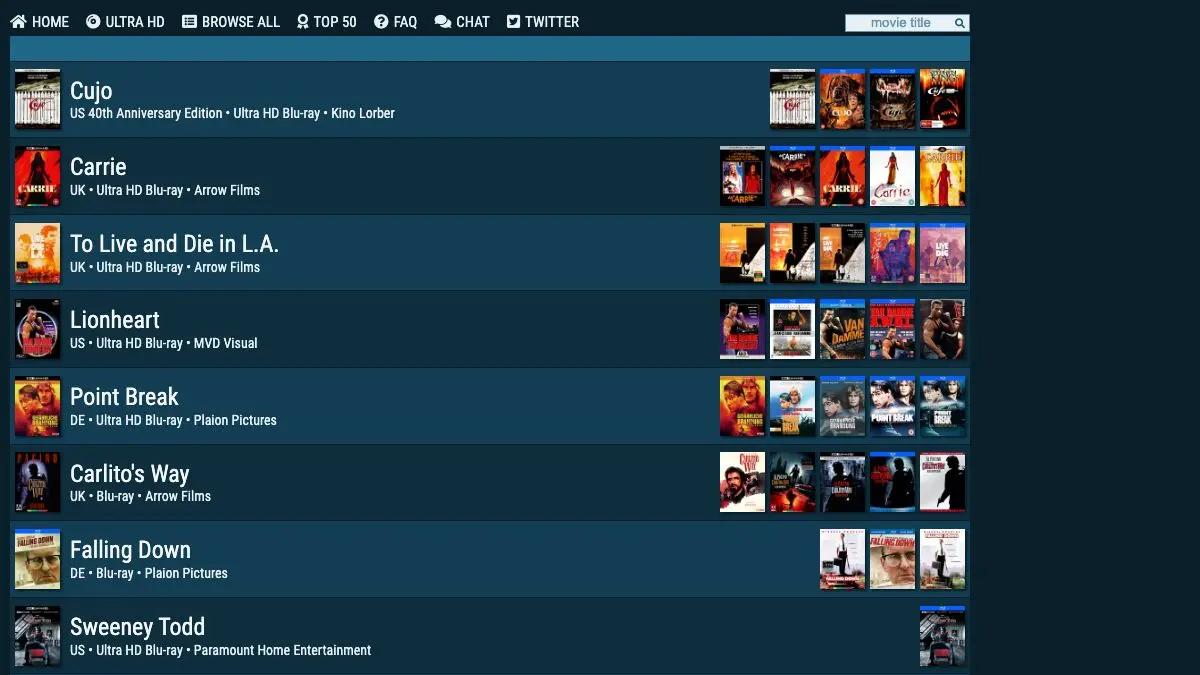
Caps-a-holic answers a question that has quietly annoyed film collectors for twenty years: there are six Blu-ray editions of this movie, from four different labels, in five different regions, and they do not look the same. Which one should I buy?
The site’s method is refreshingly blunt. It takes the same frame from each release and puts them next to each other. No star ratings, no prose about “filmic warmth.” Just the pictures, and you decide.
What is Caps-a-holic?
Home video is not a solved problem. A film gets scanned, graded, compressed and pressed to disc, and every one of those steps is a decision made by a person under a deadline. Then five years later somebody does it again with a new scan, and the results can differ enormously: sharper or smeared, greener or bluer, with the film grain preserved or scrubbed away by aggressive noise reduction. Sometimes the newer, more expensive release is visibly worse.
Marketing copy will not tell you this. Caps-a-holic will.
The site catalogs releases by film, showing the cover art for every edition it has captures for, tagged by region and format: US, UK, German, French, Australian, Italian and Austrian pressings, Blu-ray, Ultra HD Blu-ray and DVD, with the distributing label noted. Pick two, and you get matched screenshots you can flip between. Differences that are invisible in a paragraph of review text become obvious in half a second once the frames are stacked.
The archive is enormous, running to hundreds of pages of titles, and it is community-fed. Collectors and enthusiasts supply captures for new discs, which is why coverage of catalog reissues and boutique labels is so much better than you would expect from anything commercial.
Alongside the per-film comparisons there is a Top 50, a browse-everything view, a dedicated Ultra HD section, an FAQ, and a chat for the people who care about this at a level that will alarm your household.
It is, functionally, consumer protection for a hobby where a bad purchase costs thirty dollars and a permanent grudge.
What can you do with Caps-a-holic?
- Compare two editions frame by frame. Pick a film, pick two releases, and toggle between matched captures to see detail, grain and color side by side.
- Check before you buy a remaster. New scan does not automatically mean better. The comparisons make revisionist color grading and over-filtering immediately visible.
- Browse by region. Import buying is a real strategy in this hobby, and the site labels which country each pressing comes from.
- Dig into the Ultra HD section. Useful for films with multiple 4K passes, where the question is whether HDR and a fresh scan actually delivered anything.
- Scan the Top 50. A quick read on which releases people are currently arguing about.
- Spot aspect ratio and framing changes. Some editions crop, open up or reframe. Matched captures catch it instantly.
- Use it as a history of a film’s transfers. Line up every release in order and you get a visual record of how the movie has been presented over two decades.
Tips to get the most out of it
View it on the biggest screen you have. These are pixel-level differences. Judging a transfer from a phone browser defeats the entire purpose of the site.
Compare more than one frame. A single capture can flatter or damn a release unfairly. Dark scenes reveal black crush and compression, bright ones reveal color timing, close-ups reveal detail and noise reduction. Check all three before deciding.
Watch for grain, not just sharpness. The sharper-looking image is often the more heavily processed one. Waxy faces and missing fine texture usually mean digital noise reduction has been turned up, and that damage is permanent.
Cross-reference with the release date. An older disc from a good label frequently beats a newer budget reissue. The cover art will never tell you this; the captures will.
Take color grading as taste, not verdict. Teal-and-orange regrades are genuinely divisive and sometimes director-approved. The site shows you the difference; it does not tell you which one is correct.
Check the FAQ before assuming a difference is a flaw. Capture conditions and encoding can introduce small variations. The site is upfront about its methodology.
If you like Caps-a-holic, also try…
- JustWatch: once you know which release is best, work out where the film is actually streaming.
- IMCDb: the same obsessive energy, aimed entirely at identifying every car in every movie.
- A Good Movie to Watch: for when the problem is choosing the film rather than the edition.
- Nestflix: a catalog of fictional films that exist only inside other films.
More rabbit holes for people who take their media seriously in Entertainment & Fun.
Frequently asked questions
What is Caps-a-holic?
Caps-a-holic is a database of screenshot comparisons between different home video releases of the same film. It lines up frame-matched captures from Blu-ray, Ultra HD Blu-ray and DVD editions across regions and labels so you can see the differences in detail, color grading and framing directly. The archive runs to hundreds of pages of titles.
Is Caps-a-holic free to use?
Yes, browsing the comparisons is free and no account is required to look at them. The site is community-driven, with contributors supplying captures for new releases.
How do I compare two Blu-ray releases on Caps-a-holic?
Find the film, then select the two editions you want to compare from the list of covers. The site shows matched frames from each release side by side, and you can toggle between them to spot differences in sharpness, color timing, grain handling and aspect ratio.
Does Caps-a-holic cover 4K UHD releases?
Yes. There is a dedicated Ultra HD section alongside the standard Blu-ray comparisons, which is useful when a film has several remasters and you are trying to work out whether the newest disc is genuinely an upgrade.