// 2026-08-05 · Productivity · by Bob Smith
AdjustableTimer: A Countdown in a Browser Tab, Nothing Else
AdjustableTimer is a plain countdown timer that runs in any browser tab. No app, no account, no notification permissions. You set a time and it counts down.
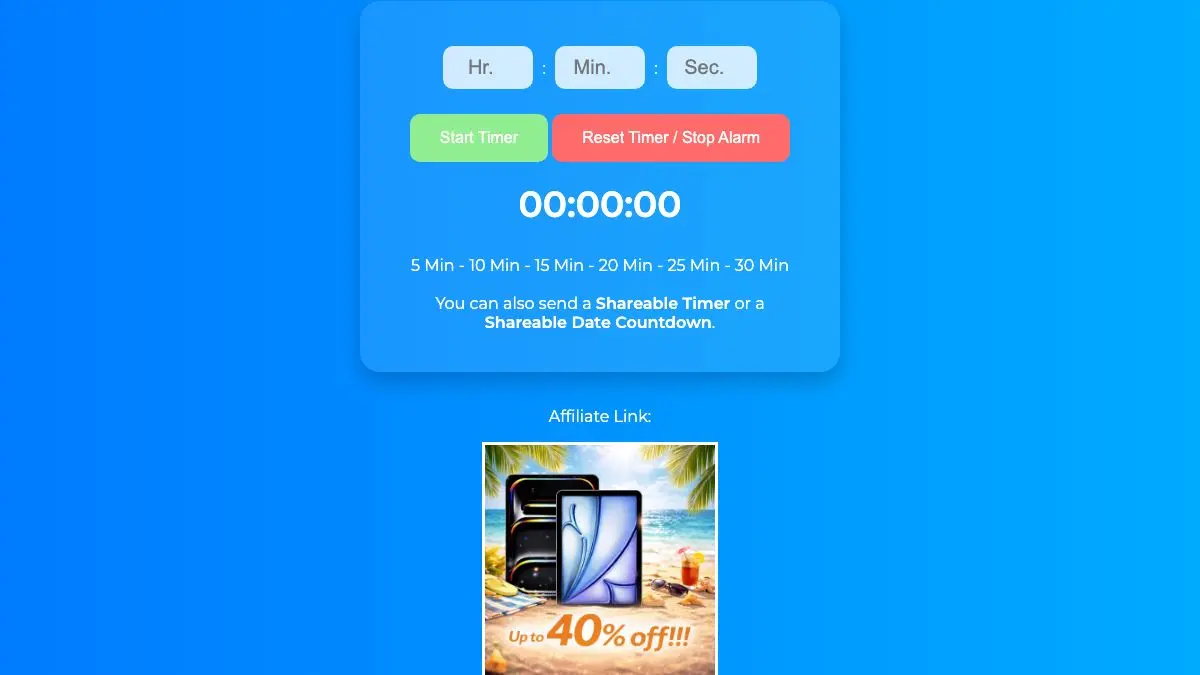
AdjustableTimer is a countdown timer that opens in a browser tab and does one thing. You set a duration, it counts down, it makes a noise at the end. The entire pitch is that this is faster than picking up your phone, and once you have tried it a few times you will find the pitch is correct.
What is AdjustableTimer?
Setting a timer should be trivial, and somehow it is not. The phone route involves picking it up, unlocking it, finding the clock app, tapping the timer tab, scrolling three wheels, and starting it, after which you are holding a phone, which is the beginning of a completely different story with a worse ending.
The desktop route is not much better. Operating system timers are buried, dedicated timer apps want an account and a subscription and a productivity philosophy, and the ones that do not want money want notification permissions and a menu bar icon.
AdjustableTimer is the version where none of that happens. It is a webpage. You already have a browser open. Set the time, hit start, keep working.
The display is large and legible from across a room, which matters more than it sounds. A timer you have to squint at is a timer you check constantly; a timer you can read at a glance from the kitchen doorway is one you can forget about until it goes off.
There is a whole category of tools like this, small single-purpose web pages that replace an app for a task that never needed an app. They survive because they load instantly, work on any device, cost nothing, and never update themselves into something worse. AdjustableTimer sits squarely in that tradition.
The one thing worth saying about it honestly: it is a timer. There is no analytics dashboard telling you how you spent your week, no streak counter, no gamification. If you want those things, this is the wrong page. If you have tried those things and found that the tracking became the task, this is very much the right page.
What can you do with AdjustableTimer?
- Set a countdown in seconds. Type or adjust the duration and start it, with no configuration in between.
- Run it in a background tab. Keep working in another window and let the countdown continue where you left it.
- Use it across devices. Phone, tablet, laptop, work machine with locked-down software installation, anything with a browser gets the same timer.
- Keep a big visible clock. The large readout makes it usable as a room timer, not just a personal one.
- Time cooking, workouts, and breaks. Anything you would have used a kitchen timer for, without the kitchen timer.
- Run work blocks. Pomodoro intervals, focused sprints, or a hard stop on a task that would otherwise eat the afternoon.
Tips to get the most out of it
Pin the tab. This is the whole trick. A pinned tab makes the timer a permanent fixture that is one click away, and the friction saved is the difference between using it daily and forgetting it exists.
Put it on a second screen or a spare device. An old phone or tablet propped up with a running countdown is the closest thing to a physical kitchen timer, and it is visible without pulling you out of what you are doing.
Check the volume before you rely on it. Browser audio depends on tab state, system volume, and whether you have muted the tab at some point. Run one short test timer so you know the alert will actually reach you.
Use it for the tasks you dread, not the ones you enjoy. A ten-minute timer on a job you have been avoiding is a remarkably effective trick, because ten minutes is short enough that starting feels reasonable and long enough that you usually keep going.
Set a timer for breaks too. The break that ends when the timer says so is a break. The break that ends when you notice the time is an afternoon.
Do not try to make it a system. Its value is that it has no opinions. The moment you start layering a methodology on top, you would be better served by a tool built for it.
If you like AdjustableTimer, also try…
- TiiiME: another minimal timer, with a different take on the same idea.
- Time and Date: the reference site for clocks, calendars, and every date calculation you occasionally need.
- World Chat Clock: work out a meeting time across time zones without a spreadsheet.
- Notepad: the same philosophy applied to writing something down.
More things that get out of your way in Productivity, and more single-purpose helpers in Tools & Utilities.
Frequently asked questions
What is AdjustableTimer?
AdjustableTimer is a browser-based countdown timer. You open the page, set a duration, and it counts down to zero with an audible alert at the end. There is nothing to install and no account to create, which makes it faster to start than unlocking a phone and finding the clock app.
Is AdjustableTimer free?
Yes, it is free to use in the browser with no signup required. You open the page and set a time.
Does the timer keep running if I switch tabs?
Yes, the countdown continues while the tab is in the background. The reliability of the alert sound depends on your browser's handling of background audio, so for something important it is worth leaving the tab visible or on a second screen rather than fully hidden.
Can I use it for the Pomodoro technique?
Yes. Set 25 minutes for a work block and 5 for a break, and repeat. It has none of the ceremony of a dedicated Pomodoro app, which for a lot of people is exactly why the habit sticks.