// 2026-07-24 · Tools & Utilities · by Bob Smith
MuscleWiki: Click a Muscle, Get the Right Exercises
MuscleWiki turns an interactive body diagram into an exercise database. Click the muscle you want to train and get demos, form notes and equipment filters.
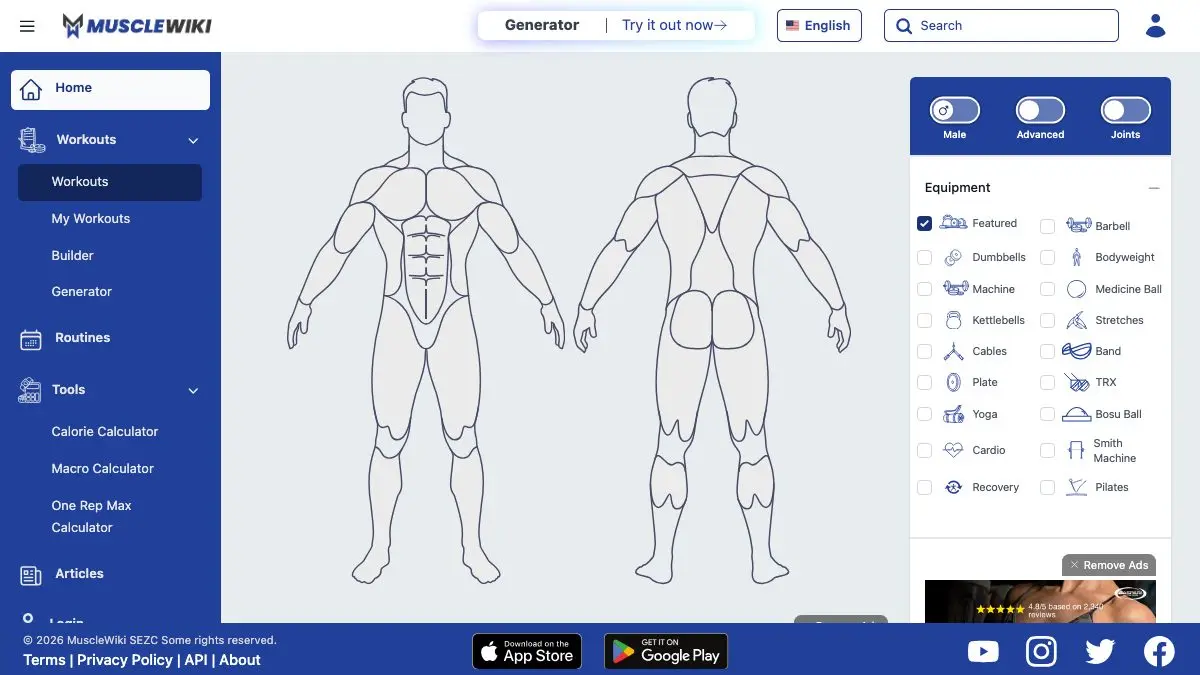
MuscleWiki is an exercise database you navigate by pointing at your own body. Click a muscle on the interactive diagram and it hands you exercises for that muscle, each with a looping animation of the movement and notes on how to do it properly. No exercise names to memorize. No wading through a search engine full of listicles.
Sore shoulder? Click the shoulder. That is the entire interface, and it is perfect.
What is MuscleWiki?
The problem MuscleWiki solves is deceptively simple: most people know which part of their body they want to train, and almost nobody knows what the exercises are called. Traditional exercise databases are organized by name, which is useless if you do not have the name.
So MuscleWiki flips it. The homepage is an anatomical figure. You click the region you want, chest, lats, quads, glutes, calves, rear delts, whatever, and it returns the exercises that hit it. Every exercise comes with a short looping demonstration so you can see the movement rather than parse a paragraph describing it, plus written notes on setup and execution.
You can flip the model to see the back, so posterior chain work is just as easy to find as the muscles you can see in a mirror. And you can filter by the equipment you actually have, which is the difference between a useful tool and a list of things you cannot do.
What can you do on MuscleWiki?
- Click any muscle group on the front or back of the body diagram and get a filtered list of exercises immediately.
- Watch each movement demonstrated as a short loop, which conveys tempo and range of motion in a way a static photo never will.
- Read the form notes for each exercise, covering setup, the movement itself, and the common mistakes.
- Filter by equipment so you only see what you can actually do with a pair of dumbbells, a barbell, a machine, a band, or nothing at all.
- Filter by difficulty to avoid accidentally programming an advanced movement into your first week.
- Build a session on the fly, picking one or two exercises per muscle group without ever leaving the diagram.
The whole thing takes about thirty seconds to understand, which is roughly thirty seconds faster than any fitness app you have ever opened.
Tips to get the most out of it
- Filter by equipment first, then browse. Setting your available equipment before you start clicking means everything you see is something you can actually do today. It turns browsing from aspirational into practical.
- Flip the model to the back view early. Most beginners overtrain the front of the body simply because they never think about the muscles they cannot see. The back view is right there. Use it.
- Pair one compound with one isolation per muscle. A big multi-joint movement for strength, a smaller targeted one to finish. Two exercises per muscle group, two or three groups per session, and you have a real workout.
- Watch the loop three times before your first set. Once for the overall shape, once for the starting position, once for what the joints are doing at the top. It costs fifteen seconds and saves you months of bad habits.
- Use it in the gym on your phone. The click-a-muscle interface is faster than remembering your plan, and it means an occupied machine no longer derails your session, just click the muscle and pick a different exercise.
- Look up a muscle you have never trained. Almost everyone has one: rear delts, hamstrings, calves, forearms. Click it, pick something, add it. Twenty seconds of curiosity fixes years of imbalance.
If you like MuscleWiki, also try…
- Animated Knots: the same “show me the movement, not a diagram” philosophy applied to rope.
- How a Car Works: clear illustrated explanations of another complicated machine.
- Omni Calculator: hundreds of practical calculators, including plenty for fitness and nutrition.
- Supercook: tells you what you can cook from what is already in your kitchen, which pairs suspiciously well with a training plan.
More genuinely useful tools live in our Tools & Utilities collection.
Frequently asked questions
What is MuscleWiki?
MuscleWiki is an exercise reference built around an interactive body diagram. You click the muscle group you want to train and it returns exercises for it, each with a looping animation showing the movement and written form notes explaining how to perform it. It replaces searching for exercise names with simply pointing at the part of your body you care about.
Is MuscleWiki free?
Yes, the website is free to browse with no account required. You can click through the body diagram, view exercise demonstrations and read the form notes without signing up or paying for anything.
How do you use MuscleWiki to build a workout?
Pick two or three muscle groups from the diagram, filter by the equipment you actually have, and choose one compound movement plus one isolation movement for each. That gives you a balanced session in a few minutes without needing to know any exercise names in advance.
Is MuscleWiki good for beginners?
It is especially good for beginners, because it solves the hardest beginner problem: not knowing what any exercise is called. Clicking a muscle and watching the movement demonstrated removes the vocabulary barrier entirely, and the form notes cover the mistakes new lifters most often make.