// 2026-08-05 · Productivity · by Bob Smith
Raindrop.io: The Bookmark Manager That Makes Saved Links Findable Again
Raindrop.io organizes bookmarks into nested collections with tags, previews and real search, so the links you save actually turn up when you need them.
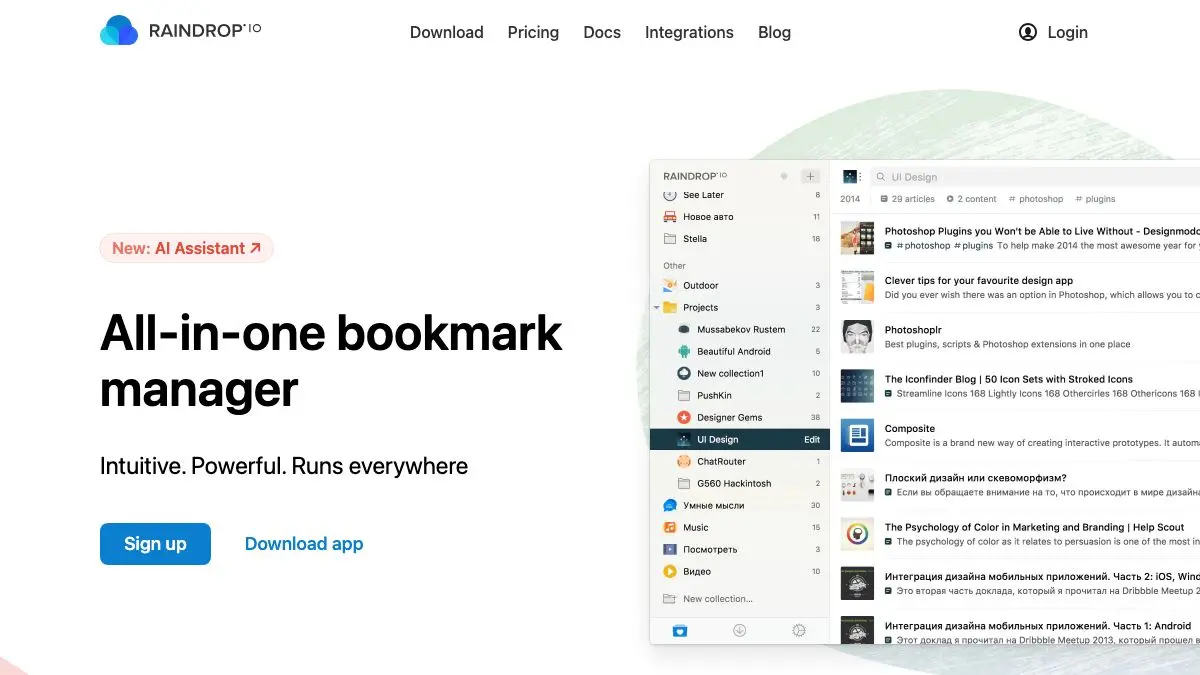
Raindrop.io is what happens when someone takes the humble bookmark seriously. Not a folder tree that you abandoned in 2019, not a browser sidebar with 4,000 entries called “Untitled”, but an actual library: collections inside collections, tags, notes, cover images, and a search box that finds things.
The bar is low, admittedly. But Raindrop clears it by a distance.
What is Raindrop.io?
Everyone has the same bookmark problem. You save something because it is genuinely useful, and then you never see it again. The folder system your browser gives you punishes you for having more than about thirty links, search only matches the page title, and the whole collection is welded to one browser on one machine.
Raindrop, built by developer Rustem Mussabekov and running since the mid-2010s, treats bookmarks as a database instead of a filing cabinet. Every saved item gets a title, a description, a preview image, a set of tags, an optional note, and a home in a collection. Collections nest. Tags cut across collections. Both work at once, which is the crucial part: you do not have to decide whether that article belongs in “Cooking” or “Reading List”, because it can live in one and be tagged with the other.
The interface then leans hard on the visual. You can view a collection as a plain list, a grid of cards, a masonry wall of preview images, or a stripped-down headline view. A folder of design references wants the masonry view; a folder of documentation links wants headlines. Being able to switch per collection is a small thing that makes the app feel like it was designed by someone who uses it.
It also goes where you go. Browser extensions for Chrome, Firefox, Safari and Edge, apps for macOS, Windows, Linux, iOS and Android, plus a perfectly usable web app and a bookmarklet for everything else. Your library is one library, not five.
And it imports. Point it at the bookmarks HTML file your browser exports, or connect an existing service, and the whole archaeological record of your saved links arrives with its folder structure intact. Then you can start the far more interesting job of cleaning it up.
What can you do with Raindrop.io?
- Save anything in one click. The extension grabs the page, pulls a preview image and title automatically, and lets you pick a collection and tags before it disappears.
- Nest collections properly. Build a real hierarchy: Work → Clients → that one project, rather than a flat list of folders with increasingly desperate names.
- Tag across the hierarchy. Tags ignore your folder structure entirely, so “to-read” or “invoice-template” pulls items from everywhere at once.
- Change how a collection looks. List, grid, masonry or headlines, set per collection, so visual references and text links each get the view that suits them.
- Search seriously. Search titles, descriptions, tags, domains and notes, and on the paid plan the full text inside saved pages.
- Highlight and annotate. Mark passages inside an article and add notes, so the reason you saved something is recorded alongside it.
- Find duplicates and dead links. The paid plan scans your library for repeated entries and URLs that no longer resolve, which is where most old bookmark collections quietly rot.
- Share and collaborate. Make a collection public as a browsable page, or invite other people to add to it.
- Keep permanent copies. Pro accounts store a snapshot of the page so it stays readable after the original vanishes.
Tips to get the most out of it
Do not rebuild your old folder tree. Importing is the easy part. The temptation is to recreate the same twelve nested folders that already failed you. Start with five or six broad collections and let tags do the fine-grained work.
Adopt a couple of status tags immediately. Something like to-read, reference and maybe covers most of what you actually need to know about a link. A saved item with no status is just clutter with a URL.
Use the browser extension’s default collection. Set an “Inbox” collection as the default so saving takes exactly one click and zero decisions. Sort it out later, in a batch, when you are in a sorting mood.
Run the broken link check before a cleanup session. Nothing motivates pruning like discovering that a third of your 2018 bookmarks now lead to a parked domain.
Make one collection public and treat it as a page. A shared collection of resources is a surprisingly good substitute for a links page or a “recommended reading” post, and it updates itself every time you save something.
Keep the search syntax in mind. Filters like #tag, domain matching and type filters turn the search box from a blunt instrument into something closer to a query language.
If you like Raindrop.io, also try…
- Internet Archive / Wayback Machine: the fallback when a bookmark outlives the page it points to.
- Kagi Small Web: a steady supply of independent, hand-written pages genuinely worth saving.
- Wiby: a search engine for the lightweight old-school web, and an excellent bookmark-collection feeder.
- Excalidraw: another tool that quietly earns a permanent place in the tab bar.
More things that make the day run smoother in Productivity, and plenty of adjacent gadgetry in Tools & Utilities.
Frequently asked questions
What is Raindrop.io?
Raindrop.io is a bookmark manager that stores your saved links in nested collections with tags, notes and visual previews. It runs in the browser and has extensions and apps for desktop and mobile, so the same library is available everywhere. The point of difference from a browser's built-in bookmarks bar is search, structure and the fact that it survives switching browsers.
Is Raindrop.io free?
There is a free tier that covers unlimited bookmarks, collections, tags and devices, which is enough for most people indefinitely. A paid Pro subscription adds features like full-text search inside saved pages, permanent copies of pages, duplicate and broken link detection, and nested collection limits lifted. No account is needed to look around, but you need one to save anything.
Can I import my existing bookmarks into Raindrop?
Yes. Raindrop imports from browser bookmark exports (the standard HTML file that Chrome, Firefox and Safari all produce) and from other services such as Pocket and Instapaper. Folder structure is preserved as collections. It is worth running the duplicate finder afterward, because most people's bookmark files contain years of accidental repeats.
Does Raindrop.io keep a copy of the page?
On the paid plan, yes: Raindrop can store a permanent snapshot of a saved page so the content remains readable even if the original site goes down or changes. On the free plan it saves the link, title, preview image and your tags and notes, but not the full page. If archiving matters to you, that is the main reason to upgrade.