// 2026-08-05 · Entertainment & Fun · by Bob Smith
TV Garden: Spin a Globe and Watch Live TV From Anywhere
TV Garden puts thousands of free live television channels on a spinning globe. Click a country, get whatever is broadcasting there right now, no account needed.
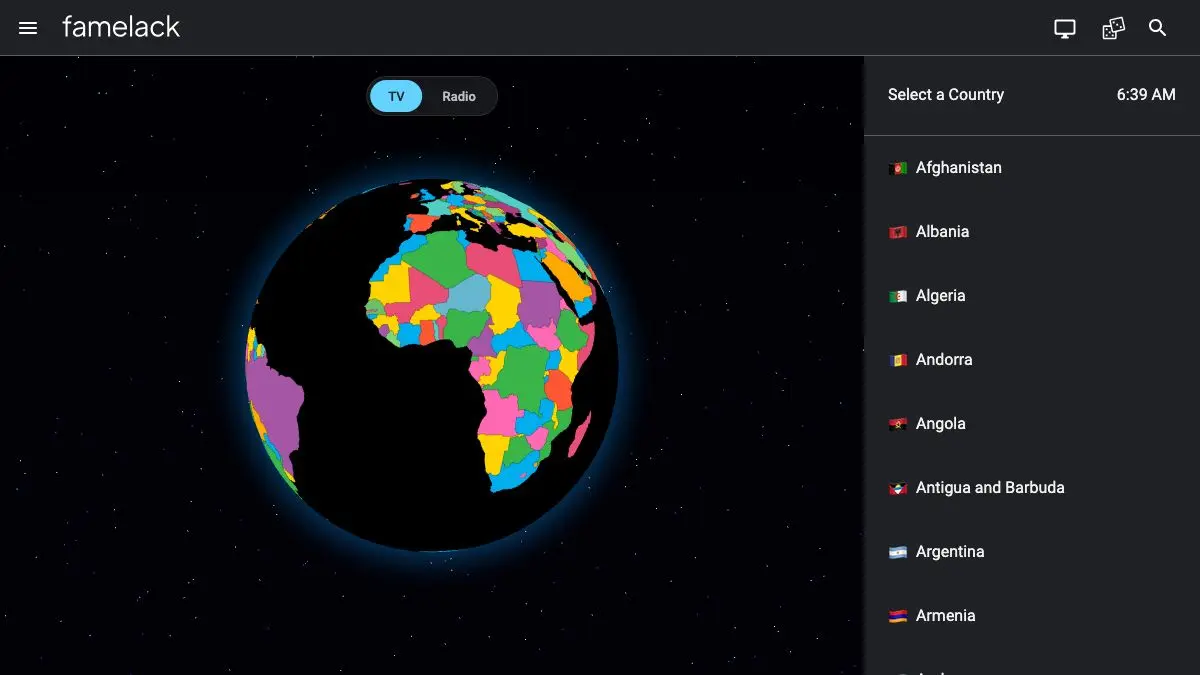
TV Garden is a globe with television inside it. You spin it, you click a country, and a live broadcast from that country starts playing. Not a curated clip, not a highlight reel. Whatever happens to be on air in Mongolia at this exact moment, which at time of writing appears to be a very long meeting.
It is the simplest possible interface for a genuinely strange experience: unmediated access to what the rest of the world is watching right now.
What is TV Garden?
Broadcasters have been quietly publishing their signals as open internet streams for years. National networks, regional stations, shopping channels, music video channels running on autopilot: an enormous amount of free-to-air television sits out there as publicly accessible stream URLs, and almost nobody watches it because there has never been a pleasant way to browse it.
TV Garden is the pleasant way. It wraps that pile of streams in a rotating globe, sorts them by country, and gets out of the way. Click a country, get a channel list, get a player. That is the whole product.
The globe is doing more work than it appears to. Choosing a country from a dropdown is a boring administrative act; spinning a planet and stabbing at a landmass is exploration. It reframes the whole thing from “browse a directory” to “see what is happening over there,” which is a much better reason to click.
And what is happening over there is rarely what you expect. Broadcast television is regional in a way that streaming has flattened out of existence. You get local news bulletins about roadworks in a town you cannot pronounce. Cooking shows in kitchens that look nothing like yours. Political talk panels where you cannot follow a word but can read the body language perfectly. Ads, which are the single most revealing thing on any country’s television, and the part streaming services never show you.
The trade-off with aggregating public streams is reliability. Broadcasters move URLs, take feeds down, or lock them to their own region, so a certain share of channels on any list will simply not play. This is the normal condition of every project like this and not a defect in the site. You skip, you find another, you carry on. The scale of the catalogue means there is always another.
What can you do with TV Garden?
- Spin the globe and land somewhere. The core interaction. Drag, click a country, and a live stream starts.
- Browse a country’s channel list. Each country expands into its available stations, so you can move down the list until you find something worth staying on.
- Skip through channels. Next and previous controls turn it into a channel surfing experience, which is exactly the right mode for this.
- Search for a specific channel or country. If you already know what you want, the search box gets you there without the geography.
- Keep favorites. Channels you want to come back to can be saved so you are not rediscovering that one perfect Japanese cooking network every time.
- Use it as ambient background. Put a foreign news channel on a second monitor and let a country’s day play out next to your work.
- Compare coverage of the same event. Watch the same story treated by broadcasters in three different countries and notice how differently it is framed.
Tips to get the most out of it
Skip fast and do not overthink it. Some fraction of streams will be dead or geo-restricted at any moment. Treat a failed channel the way you treated static on an old TV: press next and move on.
Go for countries you know nothing about. The instinct is to click your own country or somewhere you have visited. Resist it. The value here is entirely in the unfamiliar, and the smaller the broadcaster, the stranger and better the programming.
Watch the commercials. Everyone skips ads out of habit. Do not. Foreign advertising tells you more about a place in ninety seconds than an hour of its news does, and it is the part of broadcast television that no streaming catalogue preserves.
Mind the time zones. Clicking a country at 3am local time gets you an infomercial or a test card. If you want real programming, do a bit of mental arithmetic and aim for someone else’s prime time.
Turn on subtitles or just watch without them. Many channels carry burned-in captions in their own language. Either way, watching television you cannot understand is a genuinely relaxing thing to do, and the lack of comprehension is part of the appeal.
Cast it to an actual television. The experience improves dramatically on a real screen across the room, which is, after all, where this content was designed to be seen.
If you like TV Garden, also try…
- Radio Garden: the same globe-spinning idea applied to live radio stations worldwide.
- Explore.org Live Cams: live feeds of bears, puffins and reefs instead of newsreaders.
- Drive & Listen: drive through a foreign city with its local radio playing, which pairs perfectly with all of this.
- My90sTV: the same channel-surfing feeling, aimed backward in time instead of outward in space.
More ways to lose an evening in Entertainment & Fun, or keep wandering the planet in Maps & Exploration.
Frequently asked questions
What is TV Garden?
TV Garden is a website that lets you watch live television channels from around the world through a globe interface. You spin the globe, click a country, and it plays a live stream from that country in your browser. The channels come from publicly available free-to-air streams rather than from any paid subscription.
Is TV Garden free?
Yes. There is no account, no subscription and no signup, and it works in a normal browser tab on desktop and mobile. It aggregates streams that broadcasters already publish openly on the internet.
Why do some TV Garden channels not load?
The site points at streams hosted elsewhere, so a channel breaks when the broadcaster changes its stream URL, takes it down, or restricts it by region. This is normal for any aggregator of public streams. Skipping to the next channel in the list almost always finds one that works.
Can I watch TV Garden on a phone or a TV?
It runs in a mobile browser, and casting the tab to a television generally works. Because it is a website rather than an app, the experience depends on your browser's video playback, and a large screen makes the country and channel lists considerably easier to navigate.