// 2026-08-02 · Entertainment & Fun · by Bob Smith
My90sTV: Channel-Surf the 1990s From Your Browser
My90sTV is a simulated 90s television you flip through with a remote, static, glow, and channels of real 1990s clips. Free, and it now lives on MyRetroTVs.
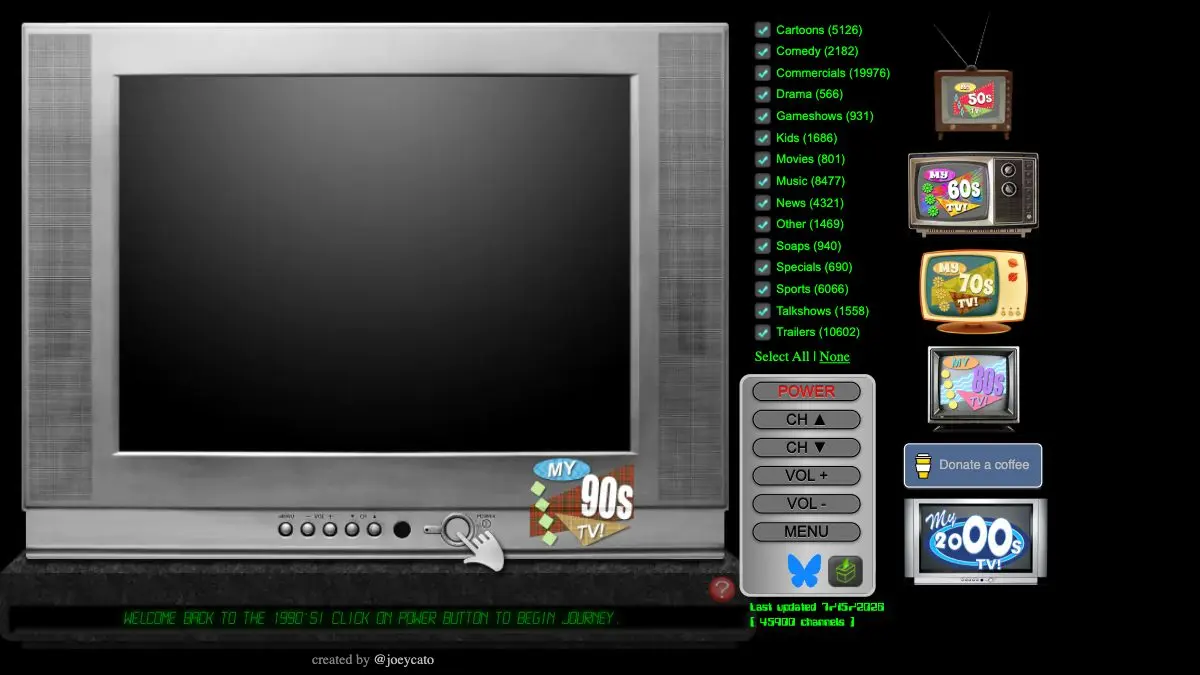
My90sTV is a simulated 1990s television set that lives in your browser. There’s a TV on screen, a remote beside it, and channels that drop you straight into the decade, music videos, ads, show fragments, all arriving mid-clip like you just walked into the room. Turn it on, press the channel button, and lose forty minutes. Heads up on one thing: the old my90stv.com address has been retired, and the set now runs at 90s.myretrotvs.com as part of the MyRetroTVs collection.
What is My90sTV?
It is a channel-surfing simulator, and the “surfing” part is what makes it special. Most nostalgia sites hand you a playlist. My90sTV hands you a dial. Nothing starts at the beginning, every channel is already running when you land on it, exactly as television used to work, so you catch the second half of a commercial and the last chorus of a song and it feels genuinely, uncannily like 1994.
The presentation does a lot of the work. There’s a chunky TV frame, a clickable remote with POWER, CH, VOL and MENU buttons, a static burst between channels, and an optional glow around the tube. You can dial in five different levels of vintage picture noise if you want your nostalgia grainy. It’s the kind of detail work that could have been skipped and absolutely wasn’t.
It’s made by an independent creator, @joeycato, who runs a whole family of these things, a separate set for the 50s, 60s, 70s, 80s, and 2000s, each styled to its own era. The 70s set even has a black-and-white button.
What can you do on it?
- Flip channels with a remote. Click CH up and down, or use the arrow keys. Number keys jump you around the dial directly.
- Filter what you see. A panel beside the TV lets you narrow the content types: click None, then tick just Music, and you’ve got an all-music-video channel.
- Crank the grain. Press N to cycle through five levels of picture static, and G to toggle the glow effect if it’s distracting.
- Go full-screen. Press F and the TV frame drops away, leaving just the clips filling your monitor.
- Switch to Playlist Mode. Press P and channels play from the start and roll on to the next one automatically: the anti-surfing option, for background viewing.
- Grab the clip. Press Y to open whatever’s playing on YouTube directly, where you can pause and rewind properly. The TV powers itself off so the audio doesn’t double up.
- Hit MENU for the cheat sheet. Or press H. Every shortcut is listed there.
Tips to get the most out of it
- Learn three keys and forget the mouse. Space for power, arrow keys for channels, F for full-screen. That’s the whole experience, and doing it by keyboard feels far more like holding a remote.
- Resist the filter at first. The magic is in the collision, a soda ad slamming into a news bumper slamming into a power ballad. Filtering to just music turns it into a jukebox and loses the texture.
- Turn the static up, not off. Two or three levels of noise sits in the sweet spot between “clean stream” and “unwatchable.” It’s a small thing that changes the whole mood.
- Use Playlist Mode as background TV. Full-screen plus playlist mode is a legitimately nice thing to have running on a second monitor while you work.
- Then betray the decade. Once you’re done with the 90s, go check the 70s set and hit the B/W button. Watching the same idea rendered in a different era’s hardware is half the fun of the collection.
If you like My90sTV, also try…
- The Nostalgia Machine: the audio-only version of this feeling: pick a year, get the hits.
- Poolside FM: an 80s Macintosh desktop that plays summer music, and commits just as hard to the bit.
- Cameron’s World: a collage built entirely from salvaged GeoCities pages, for when you want the 90s web instead of 90s TV.
More time-wasters of this caliber on the Entertainment & Fun page. But go turn the set on first, MyRetroTVs has the 90s channel warm and waiting.
Frequently asked questions
What is My90sTV?
My90sTV is a simulated 1990s television set that runs in your browser. You get an on-screen TV with a working remote, and flipping channels drops you into real clips from the decade, music videos, commercials, and show segments, complete with static between channels. It is part of the MyRetroTVs family of decade simulators.
Is My90sTV free?
Yes, it is free to use with no account needed. The creator funds it through voluntary donations rather than subscriptions, and it runs entirely in the browser with nothing to install.
Where is My90sTV now?
The original my90stv.com domain has been retired and now points visitors to MyRetroTVs, where the 90s set lives at 90s.myretrotvs.com. The simulator itself is still running and still being updated, only the address changed.
What other decades can I watch?
MyRetroTVs runs a separate television set for each decade from the 1950s through the 2000s. Each one is styled to match its era, so the 70s set has a black-and-white toggle and a wood-grain look while the 2000s set is a flat modern screen.