// 2026-08-08 · Tools & Utilities · by Bob Smith
CyberChef: The Cyber Swiss Army Knife, Free From GCHQ
CyberChef chains hundreds of encoding, encryption and analysis operations into drag-and-drop recipes that run entirely in your browser. Built by GCHQ, free, open source.
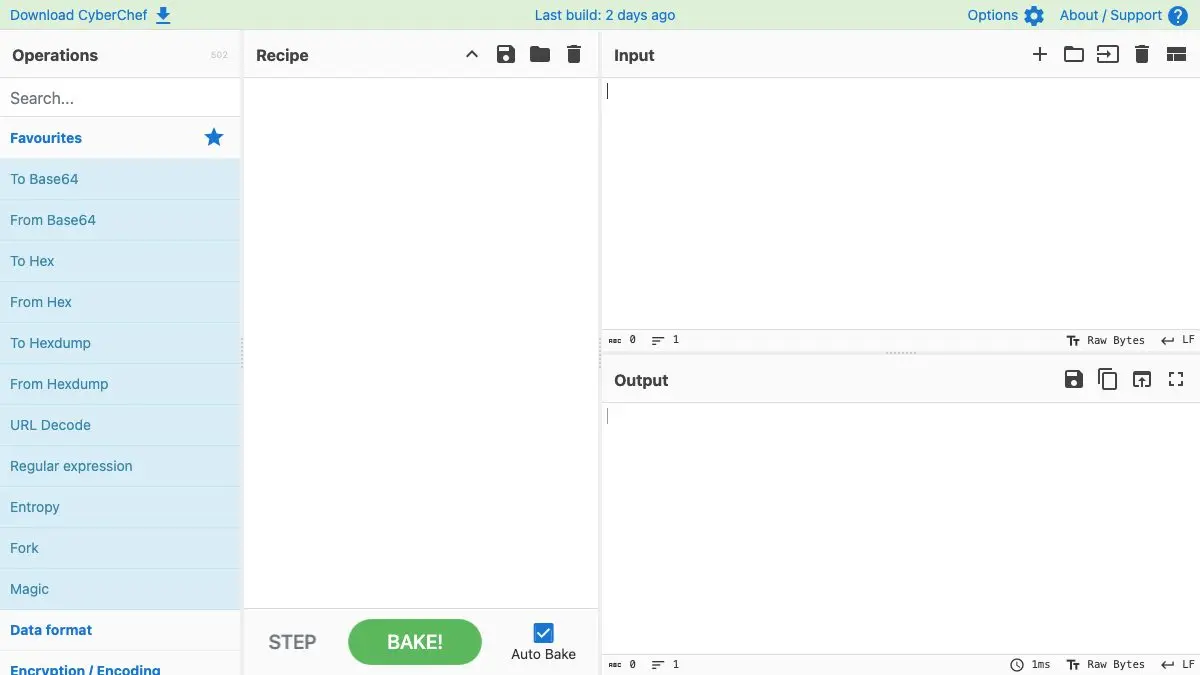
CyberChef is a free web app from GCHQ that lets you chain together hundreds of data operations, decode Base64, un-gzip, decrypt AES, parse an X.509 certificate, convert character encodings, extract every IP address from a log, into a single recipe that runs the moment you paste something in.
It is one of those tools that quietly replaces about fifteen sketchy single-purpose websites you had bookmarked, and it is genuinely fun to use.
What is CyberChef?
CyberChef calls itself “the Cyber Swiss Army Knife,” which undersells it slightly. It was conceived, built and improved over several years by a single GCHQ analyst who was tired of writing throwaway scripts, and it is now open source under the Apache 2.0 Licence.
The interface is four panels. On the left is a searchable list of operations. You drag the ones you want into the recipe panel, in order. Your data goes in the input panel, and the result appears in output. Every keystroke triggers an automatic “bake,” so you see the result change live as you tweak a parameter or reorder a step.
The crucial part: it is entirely client-side. Nothing you paste in is ever sent to a server. All the work happens in your browser, on your computer, which is why it is safe to throw a real certificate or a suspicious email header at it.
What can you do on CyberChef?
- Decode almost anything. Base64, URL encoding, hex, binary, ROT13, Morse, punycode, quoted-printable, and dozens more, in any combination and any order.
- Run the Magic operation when you do not know what you have. It detects the likely encoding, peels back multiple layers automatically, and hands you a ready-made recipe.
- Encrypt and decrypt with AES, DES, Triple DES, Blowfish, RC4 and RSA, plus hashes and checksums for every algorithm you are likely to meet.
- Drag and drop files straight onto the input panel, up to about 2GB. Hexdumps, entropy graphs, embedded-file extraction and image metadata all work on real binaries.
- Parse structured data: X.509 certificates, IPv6 ranges, user agent strings, JWTs, timestamps, protobuf, JSON and YAML.
- Debug a recipe with breakpoints and step-through, pausing after any operation to see the intermediate result rather than guessing where the chain broke.
- Share a recipe as a URL. The whole recipe is encoded in the link, so “here, run this on your file” is one message rather than a page of instructions.
Tips to get the most out of it
- Try Magic first, always. Paste your mystery string, add Magic, and let it guess. It is right far more often than it has any business being, and it saves you from manually trying six decodings.
- Use the search box, not the operation tree. There are hundreds of operations. Typing “gzip” or “entropy” is always faster than browsing categories.
- Turn off Auto Bake for big files. Live baking is wonderful on a paragraph of text and painful on a 500MB binary. There is a toggle at the bottom of the recipe panel.
- Save recipes you rebuild often. The save button produces a JSON blob or a URL. A “clean up this log file” recipe you wrote once is a recipe you never write again.
- Download the standalone build for offline work. It is a single self-contained page you can keep on a USB stick and open on an air-gapped machine, which is the whole point for a lot of its users.
- Watch the highlighting. Select text in the input and CyberChef highlights the corresponding bytes in the output. It is the fastest way to understand what a transformation actually did.
If you like CyberChef, also try…
- regex101: builds and explains the regular expressions you will inevitably want to feed into a CyberChef recipe.
- Squoosh: the same all-in-your-browser, nothing-uploaded philosophy, applied to image compression.
- Hacksplaining: hands-on walkthroughs of the vulnerabilities behind the data you are decoding.
- CloudConvert: for the file format conversions CyberChef does not cover.
Browse more genuinely useful tools in our Tools & Utilities collection.
Frequently asked questions
What is CyberChef?
CyberChef is a free, open-source web app built by GCHQ, the UK's intelligence and security agency, that lets you run data through chains of encoding, decoding, encryption, compression and analysis operations. You drag operations into a recipe, drop in your data, and it processes everything instantly. It calls itself the Cyber Swiss Army Knife, and that is an unusually accurate description.
Is CyberChef safe to paste sensitive data into?
CyberChef is entirely client-side. Neither your input nor your recipe is ever sent to the web server, because all the processing happens in JavaScript on your own machine. You can prove it by loading the page, disconnecting from the internet, and watching everything keep working. For genuinely sensitive material you can also download the standalone version and run it from a local file with no network at all.
What is the Magic operation in CyberChef?
Magic is the operation you reach for when you have no idea what you are looking at. It runs your data through a large set of detection heuristics, tries plausible decodings, and reports back what it thinks the data is along with a clickable recipe to decode it. It will happily unwrap several layers, so a string that is Base64 inside hex inside gzip often comes out readable in one click.
Is CyberChef free and open source?
Yes. It is released under the Apache 2.0 Licence and covered by Crown Copyright, with the full source on GitHub. There is no account, no paywall and no usage limit. You can host your own copy, download a single-file build to keep offline, or just use the public version at gchq.github.io/CyberChef.