// 2026-05-29 · Tools & Utilities · by Bob Smith
regex101: The Regex Tester That Explains Your Pattern
regex101 is a free online regex tester that explains every token as you type, supports PCRE, JavaScript, Python, Java, Go and Rust, and generates code.
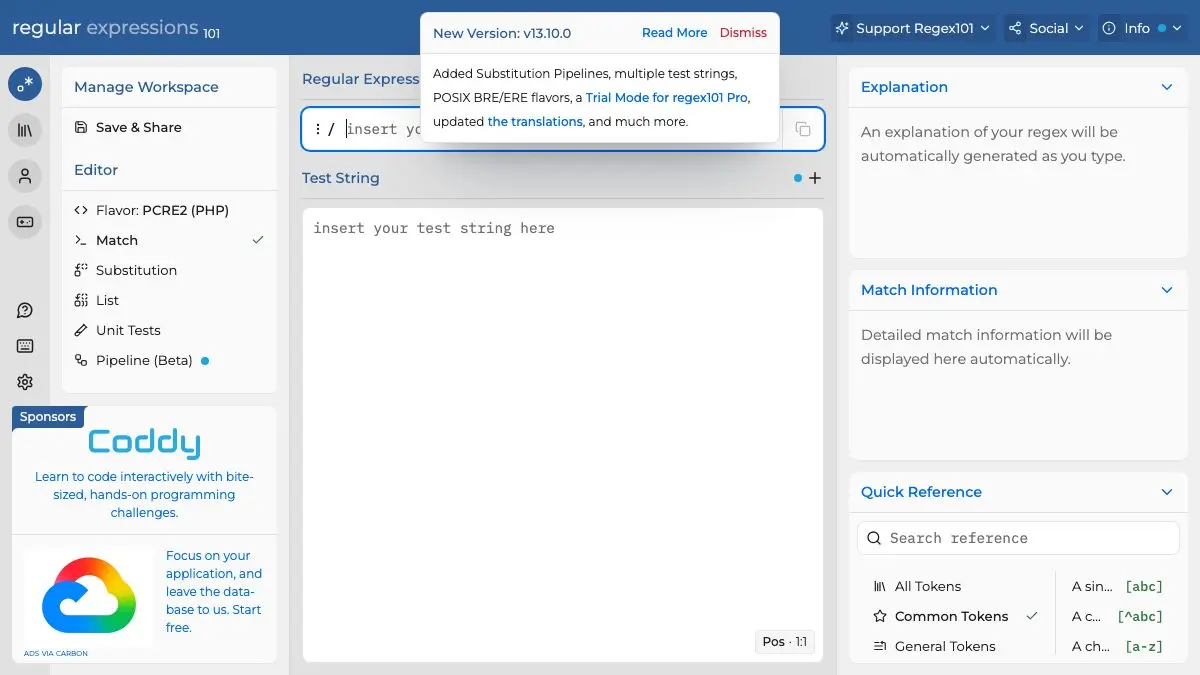
regex101 is a free browser-based regular expression tester that pulls your pattern apart token by token while you type. Paste a pattern, paste some sample text, and a live panel tells you exactly what every bracket, quantifier and lazy ? is doing. It is the fastest way to stop guessing at regex and start understanding it.
Ten minutes here beats an hour of trial-and-error in your terminal.
What is regex101?
Regular expressions have a reputation problem. They look like a cat walked across a keyboard, they fail silently, and the error messages are famously unhelpful. Most people write them by copying something from the internet and nudging characters until the tests go green.
regex101 kills that loop. The screen is split: your pattern at the top, your test string in the middle, and the results on the right. As you type, the site color-codes the matches in your text and builds a plain-English explanation of the pattern, “matches any character except line breaks,” “between one and unlimited times, as many times as possible.” You can literally watch your regex think.
The other thing it gets right is flavors. A pattern that works in Python may quietly misbehave in JavaScript. regex101 lets you switch engines, PCRE2 (PHP), JavaScript, Python, Java, Go, .NET, Rust, so you test against the one you are actually shipping in.
What can you do on regex101?
- Live explanation. The right-hand panel narrates your pattern as you build it, group by group. This is the feature that teaches you regex whether you meant to learn it or not.
- Match information. See every match, every capture group, the index it started at, and named groups laid out in a table.
- Substitution mode. Test find-and-replace before you run it on real files. Type your replacement string and watch the output update live.
- The debugger. Step through how the engine walks your string, backtrack by backtrack. When a pattern is mysteriously slow, this shows you why.
- Code generator. Turn your finished pattern into working code for your language, escaping and all. No more mangling backslashes by hand.
- Quick reference. A searchable cheat sheet of every token, sitting right there instead of in a browser tab you have to go find.
- Unit tests. Pin down strings that must match and strings that must not, so you know when a “small tweak” broke something.
- Community library. Thousands of patterns other people already solved: emails, URLs, dates, semver. Search before you build.
Tips to get the most out of it
- Set the flavor first. Before you write a single character, pick the engine you are targeting. Half of all “but it worked on the website” bugs come from testing PCRE and shipping JavaScript.
- Paste ugly test data, not clean data. Real input has trailing spaces, unicode, empty lines and someone’s name with an apostrophe. Your regex should meet those in the tester, not in production.
- Use the permalink as your bug report. Save the pattern and send the link. It carries your flags, flavor and test string, so whoever helps you sees the exact same screen. This is far better than pasting a pattern into chat and losing the escaping.
- Read the explanation for other people’s patterns. Found a scary regex in your codebase with no comment? Paste it in. You will have it decoded in about fifteen seconds.
- Reach for the debugger when things get slow. Catastrophic backtracking is a real performance bug, and the step-through view makes an abstract problem suddenly very visible.
If you like regex101, also try…
- Omni Calculator: thousands of small, well-explained calculators for when the problem is math rather than string matching.
- Excalidraw: the hand-drawn whiteboard for sketching the system your regex lives inside.
- CloudConvert: another do-one-thing-well browser tool, this time for turning any file into any other file.
- Squoosh: Google’s image compressor, with the same “see the result instantly” philosophy.
More like this in Tools & Utilities.
Bookmark regex101 now, thank yourself the next time a log file needs parsing at 6pm on a Friday.
Frequently asked questions
What is regex101?
regex101 is a free browser-based regular expression tester and debugger. You type a pattern and some test text, and it highlights every match while a side panel explains what each token in your pattern actually does. It also generates ready-to-paste code for several programming languages.
Is regex101 free?
Yes. The editor, the explanation panel, the debugger, the code generator and the community library are all free to use with no account required. An optional account lets you save patterns permanently, and the site is supported by sponsors rather than paywalls.
Which regex flavors does regex101 support?
You can switch between several engines including PCRE2 (PHP), JavaScript, Python, Java, Go, .NET and Rust. This matters because the same pattern can behave differently in each one, so testing in the flavor you will actually ship in saves a lot of confusion.
Can I save and share a regex on regex101?
Yes. Every pattern can be saved to a permanent link that carries your test string, flags and flavor with it. That link is the single best way to ask a coworker for help with a regex, because they see exactly what you see.