// 2026-05-30 · Productivity · by Bob Smith
Hemingway Editor: Make Your Writing Bold and Clear
Hemingway Editor highlights your long sentences, passive voice and adverbs in color, then hands you a readability grade. Paste text, edit, done. Free online.
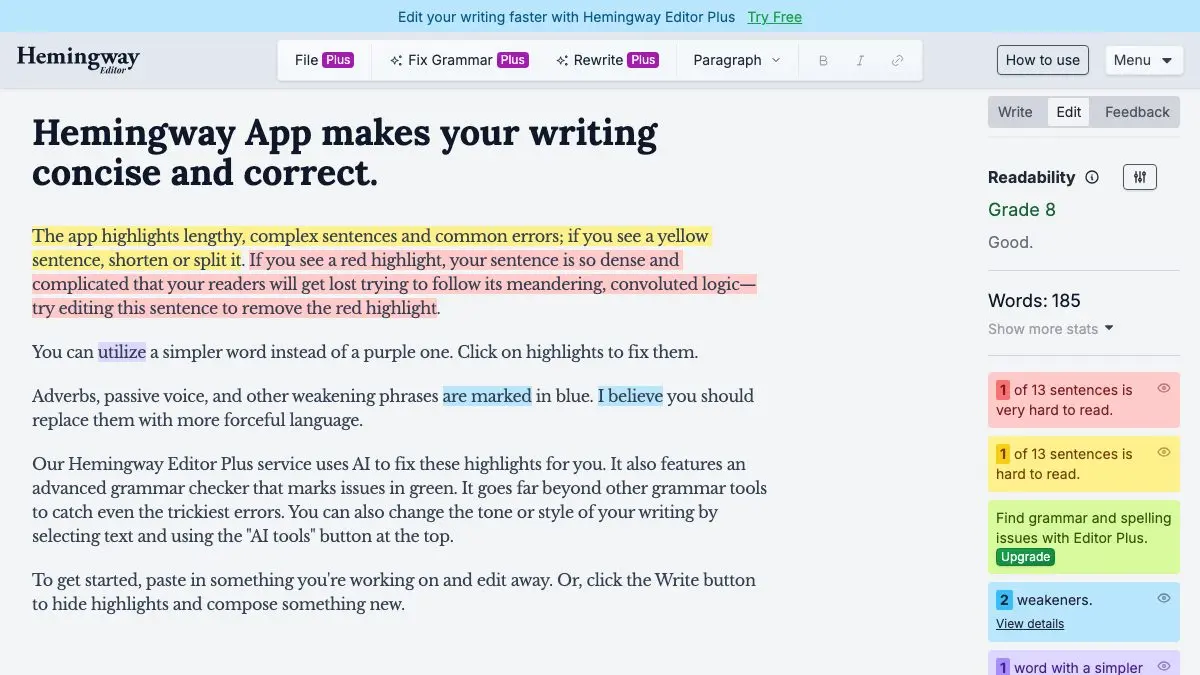
Hemingway Editor is a free web app that reads your writing and paints it in colors. Long sentences go yellow, unreadable ones go red, passive voice goes green, and every adverb you smuggled in gets a blue coat. It does not care about grammar, it cares whether a normal human can get through your paragraph on the first pass.
Paste something you wrote last week. Prepare to feel called out.
What is Hemingway Editor?
Named after the man who made short sentences a personality, Hemingway Editor takes a stubbornly simple position: most writing is worse than it needs to be because it is too dense, not because it has typos. Spell checkers handle typos. Nothing handles density.
So it does. Drop your text into the editor and the app immediately marks it up:
- Yellow: this sentence is long or complex. Consider splitting it.
- Red: this sentence is very hard to read. Split it, definitely.
- Purple: there is a simpler word available. “Utilize” wants to be “use.”
- Blue: an adverb or a weakening phrase. “Very,” “really,” “somewhat.”
- Green: passive voice. Something was done by someone, instead of someone doing something.
A sidebar counts words, characters, paragraphs and reading time, and gives you a readability grade level. That number is the whole game. Watch it drop as you cut.
The web editor is free. There is also a paid Hemingway Editor Plus with AI-assisted rewriting, grammar checking and tone adjustment, and a standalone desktop app if you would rather work offline.
What can you do on Hemingway Editor?
- Edit in place. Unlike tools that hand you a report, Hemingway is an actual editor. Fix the sentence and the highlight disappears. It is genuinely satisfying.
- Switch between write and edit modes. Write mode clears the highlights so you can draft without being nagged. Edit mode turns the judgment back on.
- Format lightly. Headers, bold, italic, bullets and links, all available, all preserved when you copy your text out.
- Test other people’s writing. Paste in a company email, a policy document, or a paragraph from a website you find annoying. You will learn a lot about why it annoyed you.
- Chase the grade. Set a target: say grade 8, and cut until you hit it. The constraint does more for your prose than any style guide.
Tips to get the most out of it
- Draft first, Hemingway second. Never write in edit mode with the highlights on. You will optimize sentence by sentence and lose the thread of the argument. Get the whole draft out, then paste it in.
- Not every highlight is wrong. Passive voice is correct when the doer is unknown or irrelevant. A red sentence in fiction may be doing rhythmic work. Treat the colors as questions, not commands.
- Kill blue first, it is the cheapest win. Adverbs are almost always propping up a weak verb. “Walked quickly” is “hurried.” “Said loudly” is “shouted.” You lose a word and gain a picture.
- Split a red sentence at its conjunction. Find the “and,” “but” or “which,” put a period there, and capitalize. Nine times out of ten the sentence was two sentences wearing a trench coat.
- Read your green sentences out loud. Passive voice is hard to spot by eye and impossible to miss by ear. If it sounds like a press release apologizing for something, rewrite it.
- Aim for grade 9 or below for anything public-facing. Blog posts, landing pages, README files, emails to your whole company. Experts read low-grade prose faster too, they just do not feel patronized by it.
If you like Hemingway Editor, also try…
- TypeLit.io: practice typing by retyping entire classic novels. A weirdly good way to absorb sentence rhythm from writers who had it.
- RhymeZone: when you need the better word rather than the shorter sentence.
- Excalidraw: sketch the structure of a piece before you write it, which fixes more clarity problems than any editor can.
- BetterExplained: a masterclass in explaining hard ideas in plain language.
Browse more tools like this in Productivity.
Go paste your last cover letter into Hemingway Editor and watch it light up like a Christmas tree. Then fix it.
Frequently asked questions
What is Hemingway Editor?
Hemingway Editor is a free web app that checks your writing for clarity rather than grammar. You paste in text and it color-codes hard-to-read sentences, passive voice, adverbs and needlessly complicated words, then scores the whole thing with a readability grade level.
Is Hemingway Editor free?
The core web editor is free and needs no account, you can paste text in and start editing straight away. There is a paid tier, Hemingway Editor Plus, which adds AI-assisted rewriting, grammar checking and tone adjustment, plus a separate desktop app.
What do the colors in Hemingway Editor mean?
Yellow marks a long or complex sentence, red marks one that is very hard to read, purple flags a word with a simpler alternative, blue highlights adverbs and weakening phrases, and green marks passive voice. The goal is to reduce the highlights, not eliminate them.
What is a good Hemingway readability grade?
For general audiences, aim for grade 9 or lower, that is roughly the reading level of most newspapers and popular non-fiction. A lower grade does not mean dumbed down, it means fewer readers bounce off your sentences before reaching your point.