// 2026-08-05 · Tools & Utilities · by Bob Smith
Keybr: The Typing Trainer That Targets the Keys You Keep Missing
Keybr watches which keys slow you down and generates practice words made mostly of those letters, adding new keys only once you have earned them.
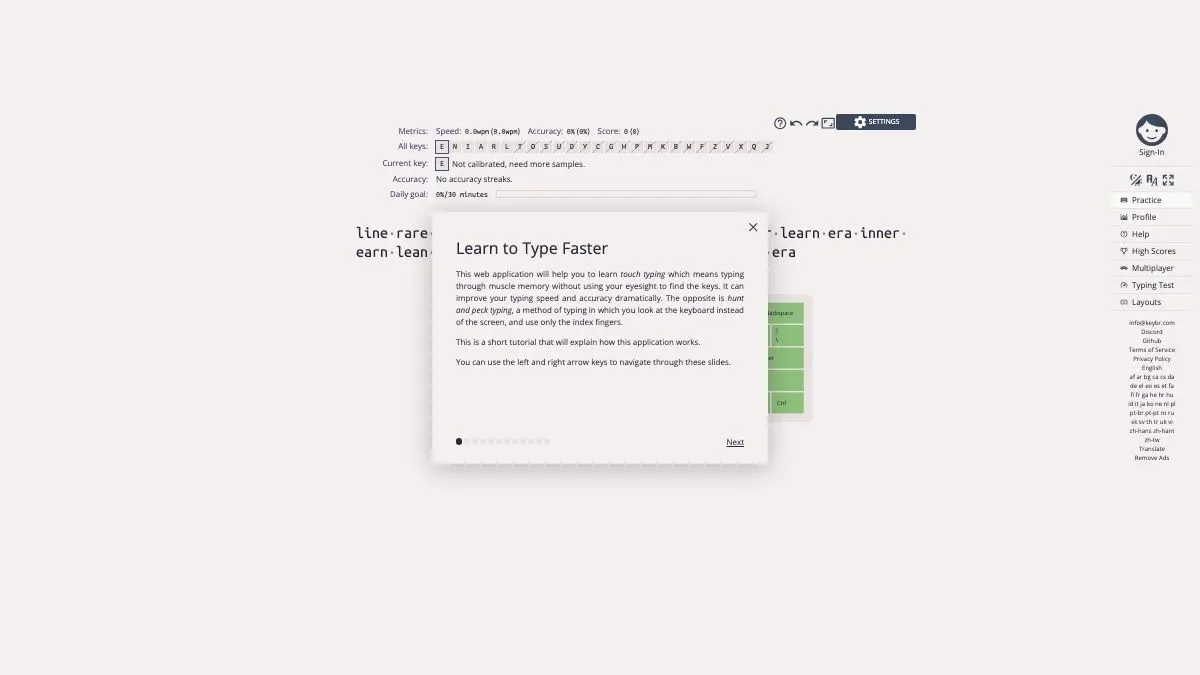
Keybr is a typing trainer that pays attention. Most of them hand you the same passage of text as everyone else and report a number at the end. Keybr watches which specific keys make your fingers hesitate, and then builds your next lesson almost entirely out of those keys until the hesitation goes away.
It is the difference between practicing and being coached.
What is Keybr?
The problem with typing practice is that English is not evenly distributed. Type a few paragraphs of ordinary text and you will hit e and t hundreds of times and z maybe twice. If your weak spots happen to be the rare letters, ordinary practice barely touches them. If your weak spot is a common bigram, you just repeat the same bad habit at speed.
Keybr fixes this by not using ordinary text. It generates pseudo-words: strings that are not real words, but that follow the phonetic patterns of a real language closely enough to be pronounceable and rhythmic to type. Then it controls the letter distribution inside them.
You start with a small handful of home row keys. You type. The site records speed and accuracy per key, and when your performance on the current alphabet crosses a confidence threshold, it unlocks another letter and immediately floods the next lessons with it. Get sloppy and the balance shifts back. The whole curriculum is generated from your own error data, continuously.
The statistics view is where this becomes genuinely satisfying. There is a heat map of the keyboard showing which keys are fast and which are dragging, a learning curve of your speed over time, and a per-key breakdown that will tell you, without sentiment, that your left ring finger is the reason you cannot break 70 words per minute.
Beyond the adaptive lessons there are other modes: a straight typing speed test, practice on real words from a word list, custom text you paste in yourself, and options for numbers, punctuation and capital letters. And it supports a long list of keyboard layouts and languages, which makes it one of the better ways to learn Colemak or Dvorak without inventing your own drills.
It is free, requires no account to start, and the source is public.
What can you do with Keybr?
- Run adaptive lessons. The core mode: pseudo-words weighted toward your weakest keys, with new letters unlocked as you earn them.
- See your per-key statistics. A keyboard heat map plus a table of speed and accuracy for every individual key, updated as you go.
- Track your learning curve. A chart of speed and accuracy over sessions, which is the only honest way to tell whether you are actually improving.
- Take a speed test. A conventional timed test when you want a number rather than a lesson.
- Practice with real words. Switch from generated pseudo-words to actual vocabulary once the mechanics are solid.
- Type your own text. Paste in anything you like and practice on it, useful for code, foreign languages or a passage you want to internalize.
- Add numbers and punctuation. Optional layers that most typists neglect entirely and then fumble in real work.
- Learn a new layout. Full support for Dvorak, Colemak, Workman and many national layouts, with the adaptive system working identically on each.
- Sync across devices. An optional account carries your statistics between machines.
Tips to get the most out of it
Prioritize accuracy over speed, ruthlessly. Keybr’s unlock logic rewards accuracy, and so does reality. Typing fast with errors just means typing plus backspacing. Slow down until the mistakes stop, and the speed arrives on its own.
Do short sessions, often. Ten minutes daily beats an hour on Sunday by a wide margin. Motor learning consolidates between sessions, not during them, and fatigue produces exactly the sloppy habits you are trying to remove.
Do not look at the keyboard, even once. The generated words are unfamiliar by design, which makes glancing down tempting. Every glance teaches your hands to depend on it. If you must, cover them.
Read the per-key table, not just the overall speed. The heat map tells you where the actual problem is. Almost everyone finds one or two keys dragging the whole average down, and they are rarely the ones you would have guessed.
Turn on punctuation before you feel ready. Real typing is full of commas, apostrophes and parentheses, and most people who type 80 words per minute on plain prose collapse to 40 the moment brackets appear.
If you are switching layouts, commit fully for two weeks. Keybr handles alternative layouts well, but alternating between the old and new layout during the day undoes the training. Pick a window where a temporary drop in speed is survivable.
If you like Keybr, also try…
- Monkeytype: the minimalist speed test everyone benchmarks on, once your fundamentals are solid.
- TypeLit.io: practice by typing your way through entire classic novels.
- Hacker Typer: the exact opposite philosophy, where every keystroke is correct and none of it matters.
- Cheatography: keyboard shortcut cheat sheets, so your newly fast hands stop reaching for the mouse.
More things that quietly upgrade how you work in Tools & Utilities, with related picks over in Productivity.
Frequently asked questions
What is Keybr?
Keybr is a free online touch typing trainer that adapts to your individual weaknesses. Instead of giving everyone the same drills, it tracks your speed and accuracy on every key and generates pronounceable pseudo-words weighted toward the letters you struggle with. New letters are introduced only once your accuracy on the current set is good enough.
Is Keybr free?
Yes, Keybr is free to use and works without an account, storing your progress in the browser. Signing in with an account syncs your statistics across devices, which is worth doing if you practice on more than one machine. The project's source code is publicly available.
Why does Keybr use made-up words?
Because real text does not contain the letters you need in the proportions you need them. Keybr generates pseudo-words from a phonetic model, so the text still feels typeable and pronounceable, but the letter mix is skewed heavily toward your problem keys. Once you are confident, you can switch to modes that use real words or your own text.
Does Keybr support layouts other than QWERTY?
Yes. It supports alternative layouts such as Dvorak, Colemak and Workman, along with many national keyboard layouts and languages. This makes it one of the more practical tools for learning a new layout from scratch, since the adaptive lesson system works the same way regardless of where the keys sit.