// 2026-08-05 · Entertainment & Fun · by Bob Smith
Sandboxels: A Falling-Sand Sandbox That Actually Does Chemistry
Sandboxels is a browser falling-sand game with hundreds of elements, real temperature and reactions. Drop sand, then set it on fire and see what it becomes.
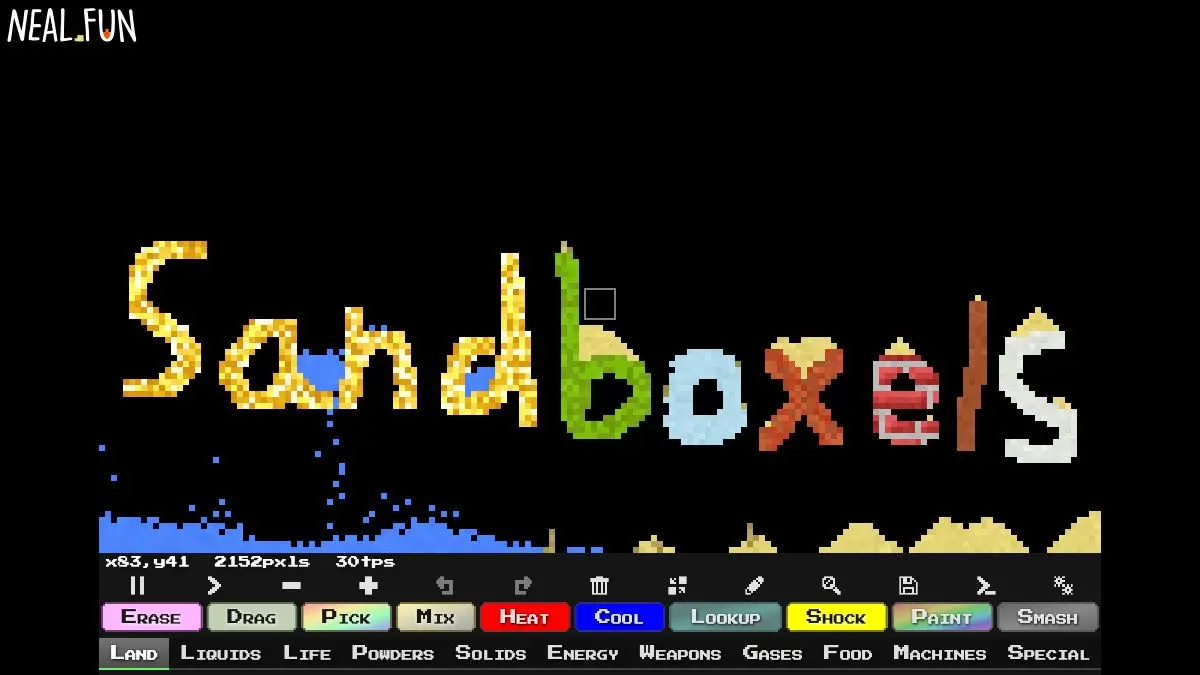
Sandboxels starts the way every falling-sand toy starts: a blank grid, a cursor, and some sand that piles up believably. Then you notice the element list has a scroll bar. Then you notice the scroll bar is quite small. There are hundreds of materials in here, and most of them have opinions about each other.
Pour water on quicklime and it heats up. Heat sand enough and it becomes glass. Set fire to a plant and you get ash, smoke and, if the fire spreads to the ants, a very bad afternoon for the ants.
What is Sandboxels?
Falling-sand games are an old genre. The classic ones gave you maybe a dozen materials, a gravity rule and a fire rule, and that was enough to keep people occupied for hours. Sandboxels, made by the developer R74n, takes that framework and pushes it hard in one specific direction: chemistry.
The key addition is real temperature. Every pixel has one. Materials have melting points, boiling points, ignition points and freezing points, and they change state when they cross them. Water becomes steam becomes water again when it hits something cold. Metal melts into molten metal and pools. Fire is not a decorative sprite, it is a heat source, and the heat propagates outward through whatever it touches at a rate that depends on the material.
On top of that sits an enormous reaction table. Acids dissolve specific things and ignore others. Gases mix and combust. There is a whole biology layer: seeds that germinate into plants, insects that eat things, creatures that die and rot into nutrients feeding the next generation. There is a food category that is arguably a cooking simulator hidden inside a physics toy, and an electronics category that lets people build working circuits inside a sand game.
The result is that Sandboxels stops being a toy about watching sand fall and becomes a toy about hypotheses. You start asking questions. What happens if I freeze this? What happens if I drop molten iron into liquid nitrogen? What is on the other side of this reaction? And unlike a real lab, the cost of finding out is one click on the reset button.
It is also, importantly, dense rather than polished. The interface is a wall of tiny colored buttons grouped into categories, with no tutorial and no onboarding. That is a feature. Learning Sandboxels is learning it the way you learned games as a kid, by clicking everything and seeing what explodes.
What can you do with Sandboxels?
- Paint with hundreds of elements. Solids, liquids, gases, powders, foods, plants, life forms, machines and a long tail of things that defy category.
- Play with temperature directly. Heat and cool tools let you push any region toward any temperature and watch materials change state in sequence.
- Run chemical reactions. Combine materials and get products, sometimes obvious, frequently not, occasionally catastrophic.
- Grow an ecosystem. Plant seeds, add water and light, introduce insects, and watch a small closed system establish itself and then collapse.
- Build electronics. Wires, power sources and switching elements let you construct circuits and simple logic inside the simulation.
- Save and share worlds. Snapshots of a scene can be saved and passed around, which is how the community trades its more elaborate contraptions.
- Install mods. Community-written JavaScript mods add elements, tools and entire new mechanics on top of the base game.
- Play offline. Once loaded it keeps working without a connection, which makes it excellent airplane material.
Tips to get the most out of it
Open the element list and just read it. Ten minutes of skimming the categories will teach you more than an hour of experimenting blindly, because half the fun is knowing that something like liquid nitrogen or antimatter is available in the first place.
Learn the heat and cool tools first. Temperature is the master variable here. Once you can heat and chill a region on demand, most of the element set opens up, because so many materials are just other materials at a different temperature.
Build a container before you build an experiment. Pick a solid that will not melt or dissolve under what you are about to do, box in your work area, and you will stop losing experiments off the bottom of the screen.
Slow down or pause the simulation. There are speed controls and a pause. Complex reactions happen faster than you can watch, and stepping through them is the difference between seeing a result and understanding a process.
Try to make something specific. Aimless clicking gets old after a while. Setting a goal, a working steam engine, a self-sustaining garden, a bomb with a delay fuse, is what turns the toy into a puzzle.
Expect the frame rate to suffer. A screen full of active fluid, fire and creatures is a lot of per-pixel simulation. Keep scenes contained if you want them to run smoothly.
If you like Sandboxels, also try…
- Sandspiel: a gorgeous, minimal take on the same genre, focused on beauty rather than breadth.
- The Powder Toy: the heavyweight desktop ancestor, with deeper physics and a huge library of shared saves.
- Orb Farm: a tiny sealed aquarium ecosystem you tend rather than blow up.
- WebGL Fluid Simulation: pure fluid dynamics with no rules to learn, just smear the mouse around.
Find more excellent time sinks in Entertainment & Fun.
Frequently asked questions
What is Sandboxels?
Sandboxels is a free falling-sand simulation game that runs in a browser, made by R74n. You paint pixels of different materials onto a grid and they interact according to rules covering gravity, temperature, state changes and chemical reactions. It has hundreds of elements ranging from ordinary sand and water to acids, gases, plants, machines and living creatures.
Is Sandboxels free?
Yes, it is free to play in a browser with no account required, and it also works offline once loaded. There are optional ways to support the developer, but the full element set is available to everyone.
Does Sandboxels work on mobile?
It does. The layout adapts to touch screens and you can paint with a finger, though the interface is dense and a larger screen makes the element menus much easier to navigate. Complex scenes with a lot of active pixels will run slower on phones.
Can you add your own elements to Sandboxels?
Yes. The game supports mods written in JavaScript, and there is an active community that shares them along with saved worlds. Mods can add new elements, new reactions and new tools, and they load into the same browser version of the game.