// 2026-08-11 · Privacy & Security · by Bob Smith
urlscan.io: Paste a Suspicious Link and Watch What It Actually Does
urlscan.io opens any URL in a sandboxed browser and hands back a screenshot, the full request log, every domain and IP it touched, and a phishing verdict — free, no account needed.
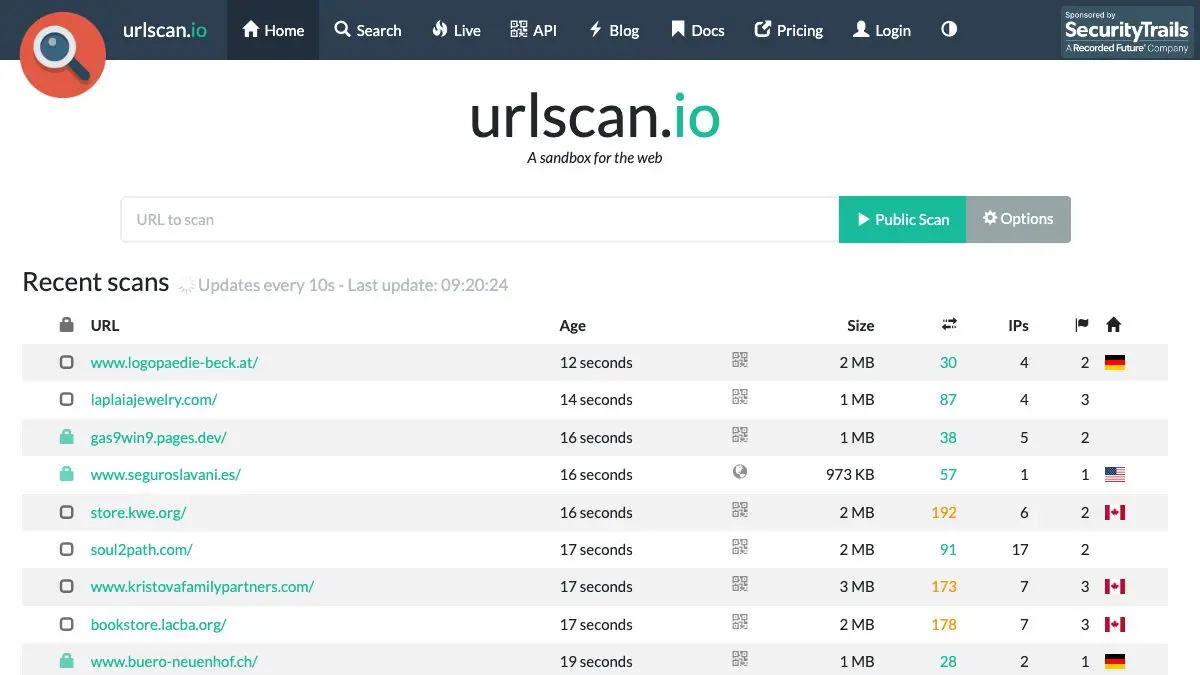
urlscan.io answers a question everyone has had and almost nobody has a safe way to answer: what happens if I click this?
You paste the link into the box. A browser somewhere else opens it, records everything the page does, and hands you back a report. A screenshot of what the page rendered. A list of every domain it phoned. The IP addresses behind those domains, the countries they sit in, the resources they served. Whether the page is pretending to be a bank. You learn all of this without the link ever meeting your browser, your cookies, or your IP address.
It is the single most useful thing you can send to a relative who has just received a text about an undelivered parcel.
What is urlscan.io?
urlscan.io is a free service that scans and analyses websites, run by urlscan GmbH in Germany. Johannes Gilger started it in late 2016, after six years working in CrowdStrike’s threat intelligence team, because analysts needed an easy way to investigate a suspicious site without infecting themselves doing it.
Submit a URL and an automated process browses to it and records the page’s behaviour: the domains and IPs contacted, the resources requested from each of them, the JavaScript that ran, the cookies that were created, the DOM as it ended up, and a full-page screenshot. On top of that raw record, urlscan matches the page against more than 900 tracked brands, which is how it tells you that the login form you are looking at is a fairly good copy of a bank and a fairly bad copy of a legitimate domain.
The scans are permanent and searchable, which turns the whole thing into something bigger than a scanner. Every public scan anyone has ever run is queryable — by domain, by IP, by page content, by the hash of a served file. Before you scan a suspicious host you can often just search it and find that fourteen other people scanned it this morning.
The front page shows the live feed of that: recent scans, refreshing every ten seconds, with a padlock next to the unlisted and private ones. It is an oddly hypnotic view of the internet’s underside.
What can you do with urlscan.io?
- See the page without visiting it. The screenshot and DOM snapshot show what the URL rendered, including the phishing form you were meant to fill in.
- Follow the redirect chain. Shorteners, tracking hops and cloaked redirects are all listed in order, so you can see where a
bit.lyactually lands. - Inspect every connection. Each contacted domain and IP is listed with its ASN, country and the resources it served — the third-party scripts, the trackers, the analytics.
- Get a verdict, with reasoning. Brand impersonation, known-malicious infrastructure and flagged behaviours are surfaced, but the underlying evidence stays visible so you are not just trusting a badge.
- Search the history. Look up a domain, an IP, a file hash or a piece of page text across every public scan ever run.
- Choose who can see it. Public, unlisted and private scans produce identical results and differ only in who can find them.
- Automate it. A free API key gets you a documented submit / result / search API, with a quota generous enough for real work.
- Ask for removal. If a scan of your own site exposes something it should not, the orange Report button on the result page and info@urlscan.io are the routes to deletion or blocking.
Tips to get the most out of it
- Change the visibility before you paste, not after. The prominent button is Public Scan, and public means indexed and searchable by anyone forever. Anything with a token, an email address or an order number in the URL should be a private scan, chosen under Options.
- Search before you scan. Free search over historical scans often answers the question outright and costs nothing — and it does not tip off the operator of a live phishing kit that someone is looking.
- Read the domain list, not just the verdict. The most informative part of a report is usually the set of hosts the page contacted. A “login page” that talks to eleven domains across four countries has told you what you needed to know.
- Assume one-time links get burned. The scanner genuinely loads the page, so magic links, invites and password resets can be consumed by the scan itself.
- Compare against the real thing. Scan the legitimate site too, then put the two reports side by side. The differences in requested resources are stark and make a good explanation for a non-technical person.
- Grab a free API key if you do this twice a week. It raises your quotas enormously and turns “check this link” into one line in a script or a chat bot.
- Watch the live feed occasionally. Five minutes on the front page teaches you more about what current phishing looks like than any awareness training.
If you like urlscan.io, also try…
- Blacklight by The Markup: point it at a site and get a plain-English report of the trackers, session recorders and fingerprinting it runs on you.
- BrowserLeaks: the other direction — everything a website can quietly learn about your browser.
- CyberChef: the tool you reach for when a scan turns up an obfuscated payload you want to unwrap.
- Have I Been Pwned: for when the link was clicked before anyone thought to scan it.
Browse more things worth bookmarking in our Privacy & Security collection.
Frequently asked questions
What is urlscan.io?
urlscan.io is a free website scanning service. You paste a URL, an automated browser visits it on your behalf, and you get back a report of everything that happened: a screenshot of the rendered page, the DOM, the JavaScript global variables, the cookies that were set, every domain and IP address the page contacted, and every resource it requested. The point is that you learn what a link does without your own machine, browser or address ever touching it. It is run by urlscan GmbH in Germany, and was started in late 2016 by Johannes Gilger after six years on CrowdStrike's threat intelligence team.
Is urlscan.io free, and do I need an account?
Scanning and reading results is free and needs no account. Signing up for a free API key raises what you can automate: the published free tier allows 5,000 public scans, 1,000 unlisted scans and 50 private scans per day, plus 1,000 search requests and 10,000 result requests. That is far more than an individual will ever use. Paid plans exist for organisations and start at 5,000 dollars a year, but they buy higher quotas and threat-hunting features, not access to the basic scanner.
Can other people see the URLs I scan?
That depends entirely on the visibility you pick, and this is the one setting worth understanding before you paste anything. Public scans appear on the urlscan.io front page and in the public search index, where anyone can find them. Unlisted scans are hidden from the front page and public search but remain visible to vetted security researchers and urlscan Pro subscribers. Private scans are reachable only by their unique ID and are not shared with third parties, sponsors or commercial customers. The default button on the home page says Public Scan, so change it under Options if the URL contains a session token, an email address, a password reset link or anything else you would not publish.
Does scanning a link break a one-time link?
Yes, and this catches people out. urlscan.io really loads the page, so a single-use invite, an unsubscribe link, a password reset or a magic login link can be consumed by the scan itself. If you need to inspect one of those, use a private scan and accept that the link may already be spent, or search urlscan.io for the domain first to see what other people's scans of that host looked like.