// 2026-08-05 · Music & Audio · by Bob Smith
Webamp: Winamp 2.9, Rebuilt Pixel by Pixel in Your Browser
Webamp is a working reimplementation of Winamp 2.9 that runs in a browser tab, plays your own audio files, and supports the original classic skins.
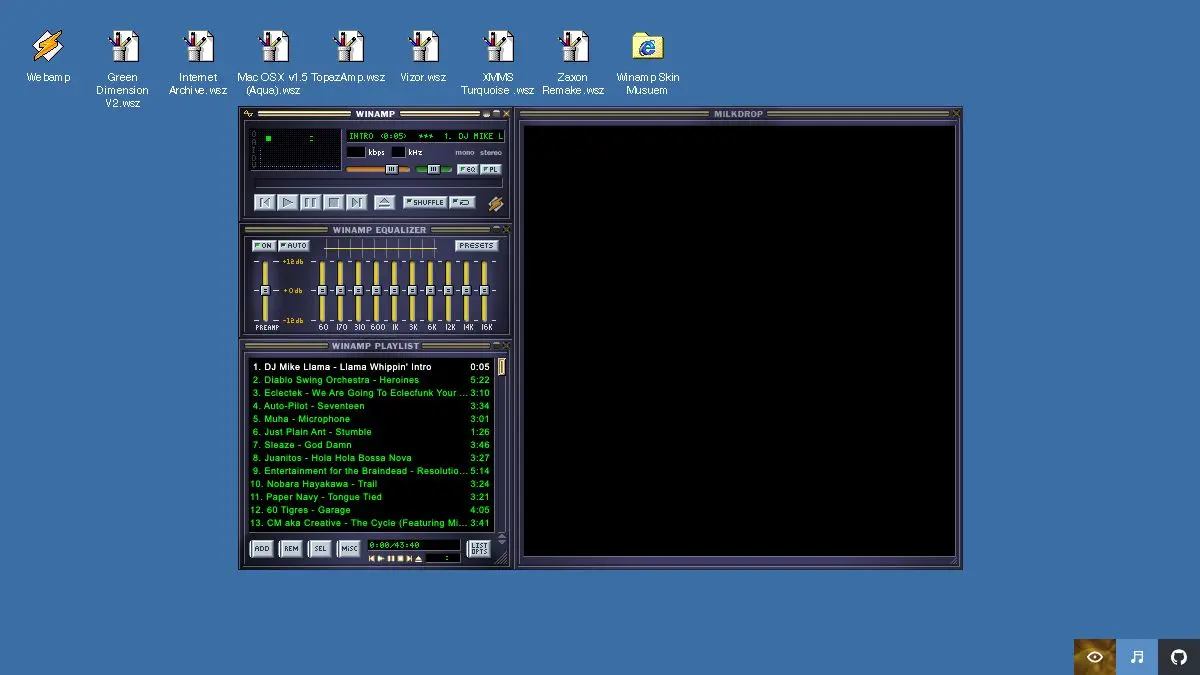
Webamp is Winamp 2.9, running in a browser tab, and it is not a screenshot or a tribute page. The equalizer works. The playlist editor works. You can shade the main window, drag the components apart, load a skin from 1999, and drop your own MP3s onto it. It really whips the llama’s ass, and it does so entirely in JavaScript.
What is Webamp?
Winamp was the default way a generation listened to music on a computer. It was small, fast, endlessly customizable, and it looked nothing like the operating system it ran on. Its skin format turned an audio player into a canvas, and tens of thousands of people made skins for it, some beautiful, most extremely of their moment.
Webamp is an open source project by Jordan Eldredge that rebuilds that player for the web. Not an approximation, a reimplementation, down to the pixel positions of the buttons and the behavior of the scrolling title text. The main window, the equalizer, and the playlist editor all snap together the way they did, and dragging one moves the group.
It works because Winamp’s classic skin format is essentially a zip file full of bitmaps with fixed layouts. Once you can parse that, you can render the whole interface in a browser and wire it up to the Web Audio API. So the enormous archive of community skins, which would otherwise be dead files, becomes live again. A companion skin museum site holds a huge searchable collection of them, and you can push one straight into the player.
The practical part matters as much as the nostalgia. Webamp is a real local audio player. Drag files in and it plays them, with a working ten-band equalizer and a visualizer. Nothing is uploaded, nothing is transcoded on a server, nothing requires an account. For playing a folder of files without installing anything, it is genuinely one of the fastest options available.
It is also open source and designed to be embedded, so other sites have used it as their audio player. That is how a browser toy becomes infrastructure: the Internet Archive, among others, has used Webamp to give archived audio an interface that fits the material.
What can you do with Webamp?
- Play your own files. Drag audio from your desktop onto the player and it plays locally, no upload, no account, no install.
- Load classic skins. Original Winamp skin files still work, so decades of community artwork is usable again.
- Browse the skin museum. The companion archive holds an enormous searchable collection, from tasteful minimalism to airbrushed dragons.
- Use the real equalizer. Ten bands plus preamp, with the same presets and the same curve shape as the original.
- Run the visualizer. The classic spectrum analyzer and oscilloscope are there, and the project also supports a Milkdrop-style visualizer for full late-nineties effect.
- Rearrange the windows. Detach the playlist and equalizer, shade the main window down to a strip, dock them back together.
- Build a playlist. The playlist editor works, including reordering and removing tracks.
- Embed it in your own site. The project is available as a package developers can drop into a page as an audio player.
Tips to get the most out of it
Drag a whole folder in. Webamp will accept multiple files at once and build a playlist, which is much faster than adding tracks one at a time.
Go to the skin museum first. Loading a skin takes about two seconds and completely changes the experience. Start there rather than staying on the default, and be prepared to lose twenty minutes scrolling.
Shade the main window. Double-clicking the title bar collapses the player to a thin strip that still shows the track and the controls. This was the killer feature in 1999 and it remains a genuinely good idea.
Actually use the equalizer. It is not decorative. The presets do what they say, and the manual sliders make a real difference on badly mastered files.
Remember it is local. Because nothing leaves your machine, it works on files you would not want to upload anywhere, and it keeps working if your connection drops after the page has loaded.
Try it on a phone, but keep expectations calibrated. A pixel-perfect recreation of a desktop interface from 1999 is not a responsive design. It works, it is just small.
If you like Webamp, also try…
- JS Paint: the same trick applied to MS Paint, faithful down to the tool cursors.
- Windows 93: a fake operating system in a browser tab, considerably stranger than it needs to be.
- Poolside FM: a music player wrapped in an unapologetically 1980s vacation interface.
- My90sTV: an evening of period-accurate television, channel surfing included.
More players and oddities in Music & Audio, and further browser archaeology in Weird & Wonderful.
Frequently asked questions
What is Webamp?
Webamp is a reimplementation of the classic Winamp 2.9 media player that runs entirely in a web browser. It recreates the original interface almost exactly, including the equalizer, playlist editor, visualizer and window shading, and it plays audio files you drag into it. It is an open source project rather than an official Winamp product.
Is Webamp free?
Yes. Webamp is free to use at webamp.org and the source code is open source, so developers can also embed the player in their own sites. There is no account, no subscription and nothing to install.
Does Webamp upload my music anywhere?
No. Files you drag into Webamp are played locally in your browser using standard web audio APIs. Nothing is uploaded to a server, which is why it works offline once the page has loaded and why it does not require any kind of account.
Can I use original Winamp skins with Webamp?
Yes, that is one of the main attractions. Webamp reads classic Winamp skin files, so decades of community-made skins still work. There is also a companion skin museum site holding a very large searchable archive of them, and you can load a skin straight from there into the player.