// 2026-07-01 · Design & Creativity · by Bob Smith
JS Paint: Classic MS Paint, Rebuilt for Your Browser
JS Paint is a pixel-faithful remake of classic MS Paint that runs in any browser: same tools, same palette, plus dark mode, offline use and multiplayer.
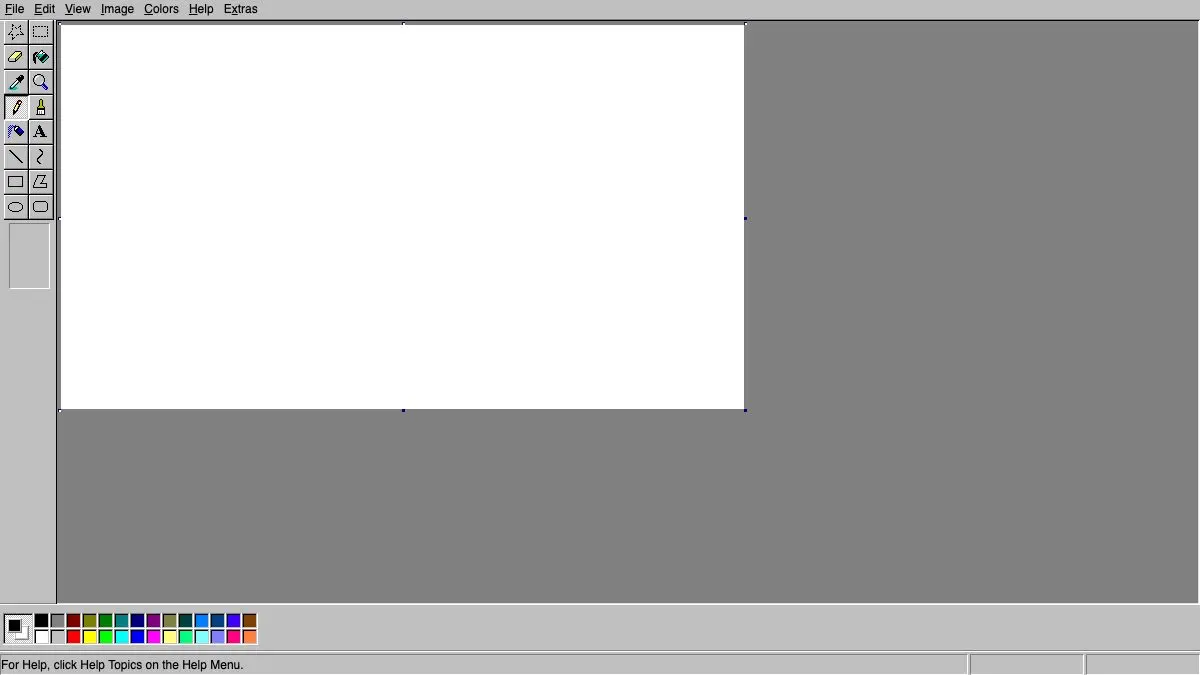
JS Paint is a free, pixel-faithful recreation of classic Microsoft Paint that runs in any browser. Same toolbar, same color strip along the bottom, same slightly clumsy fill tool that floods your entire drawing if there’s a one-pixel gap. Except now it works on a Mac, a Chromebook or a phone, and it has a few tricks the original never dreamed of.
What is JS Paint?
It’s a love letter, executed with alarming precision. Someone looked at MS Paint, the one from the era of beige towers and CRT monitors, and rebuilt it in a browser, right down to the details you’d forgotten you remembered. The chunky tool icons. The brush shape selector that appears in the box below them. The way the color palette sits in two rows at the bottom. The Image menu with Flip/Rotate, Stretch/Skew and Invert Colors.
The nostalgia is the hook, but the reason to bookmark it is that MS Paint was genuinely good at a specific job: opening an image, scribbling a red circle on it, cropping something, and getting out. Modern image editors have replaced that job with fifteen panels and a subscription. JS Paint gives you the sixty-second version back, on every device you own, for free.
And it’s open source, so it keeps getting better instead of quietly disappearing in an OS update.
What can you do with JS Paint?
Everything the original did, and then some.
- The full classic toolset. Pencil, brush, airbrush, eraser, fill, eyedropper, magnifier, text, line, curve, rectangle, ellipse, rounded rectangle, polygon, and both the rectangular and free-form select tools.
- The Image menu. Flip and rotate, stretch and skew, invert colors, and set the canvas size in exact pixels via Attributes. That skew tool is still funnier than it has any right to be.
- Open and save real files. Load an image from your computer, edit it, save it back. Nothing is uploaded anywhere: it all happens locally in your browser.
- Themes, including dark mode. Keep the authentic gray-and-teal look or switch to a modern or dark theme if you’d rather not stare into 1995.
- Install it as an app. Add it to your desktop or home screen and it works offline like a normal program.
- Draw together. Start a shared session and send someone the link: you both draw on the same canvas in real time, with visible cursors. Half a lifetime late, MS Paint got multiplayer.
- Accessibility extras. There’s support for controlling the tools by voice and an eye-gaze mode, which is a remarkable amount of thought for a nostalgia project.
Open it at jspaint.app and try to resist the airbrush. You won’t.
Tips to get the most out of it
- Right-click paints with your secondary color. This is the classic MS Paint move that most people never learned. Left-click uses the foreground color, right-click uses the background one, including with the fill tool and the eraser, which effectively gives you a two-color eraser.
- Double-click a palette swatch to edit it. You’re not stuck with the twenty-eight default colors. Double-clicking opens the color picker and you can define your own, exactly like the original.
- Learn Image > Attributes before you start. Setting the canvas to the exact pixel dimensions you need up front saves you from the eternal Paint problem of a drawing that’s 40 pixels too wide.
- Use the magnifier for pixel work. Zoom in and JS Paint gives you the classic gridded pixel view. It is a completely serviceable pixel-art editor if you’re only making something small.
- Install it, then forget it’s a website. Added to your dock or home screen, it launches offline and opens instantly, faster than any real image editor on your machine. It becomes the tool you actually reach for when someone sends you a screenshot that needs one red arrow.
If you like JS Paint, also try…
- Piskel: when the pixel art gets serious. Layers, onion skinning and animated GIF export.
- Photopea: a full Photoshop-grade editor in a browser tab, free, that opens PSD files.
- AutoDraw: draws badly on purpose, then guesses what you meant and swaps in a clean version.
- Excalidraw: for diagrams rather than doodles, with the same “no setup, just start” energy.
- More tools like this in Design & Creativity.
Frequently asked questions
What is JS Paint?
JS Paint is a free web-based recreation of the classic Microsoft Paint program, faithful right down to the toolbar icons, the color palette and the menu behavior. It runs in any modern browser on any operating system, so you can use old-school MS Paint on a Mac, a Chromebook or a phone.
Is JS Paint free?
Yes. JS Paint is free and open source, with no ads and no account required. You can open it and start drawing immediately, and your work saves to your own device.
Can I use JS Paint offline?
Yes. JS Paint can be installed as a web app and works without an internet connection once loaded, which makes it a genuinely practical replacement for a desktop paint program rather than just a nostalgia piece.
Can two people draw in JS Paint at the same time?
Yes. JS Paint supports collaborative sessions where multiple people share one canvas through a link, each with their own cursor. It is chaotic, it is delightful, and it is exactly what MS Paint always deserved.