// 2026-07-14 · Tools & Utilities · by Bob Smith
wttr.in: The Weather Forecast You Get With curl
wttr.in serves the weather as ASCII art in your browser or straight into your terminal with one curl command. No app, no ads, no cookie banner.
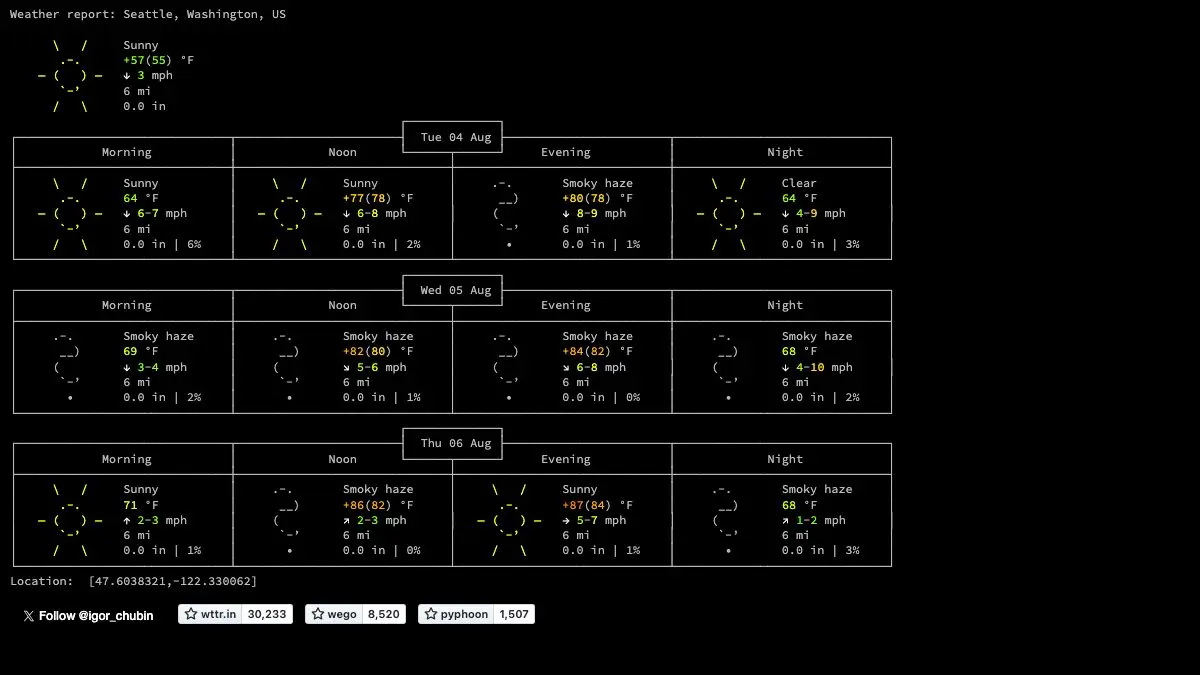
wttr.in is the weather forecast, delivered as text. Open it in a browser and you get a three-day forecast drawn in ASCII art with little pictures of clouds and rain. Or type curl wttr.in into a terminal and get the same thing without ever opening a browser. No app. No account. No banner asking about your cookie preferences while you just want to know if it will rain.
What is wttr.in?
Weather websites have become extraordinary at everything except telling you the weather. Video autoplay, location permission prompts, four ad slots, an app install nag, and somewhere in there, a temperature.
wttr.in is the correction. One request, one response, all text.
The default view gives you current conditions plus a three-day forecast, each day split into morning, noon, evening, and night, with temperature, wind, visibility, and precipitation. The weather symbols are drawn in ASCII, which sounds like a gimmick until you realize it means the forecast renders identically everywhere, a browser, an SSH session, a Raspberry Pi with no display server, a script.
The whole thing is configured through the URL. Want it in French? fr.wttr.in. Metric units? Add m. A narrow version for a phone-sized terminal? Add n. A PNG image instead of text? Add .png to the end. It is an entire options system with no settings page.
And because it speaks plain HTTP with no API key, it slots into anything. Status bars, cron jobs, dotfiles, shell prompts. People have been quietly wiring this into their setups for years.
What can you do with wttr.in?
- Get the default forecast.
curl wttr.inuses your detected location. Add a city, airport code, or place name for anywhere else. - Go compact.
curl wttr.in/?format=3returns a single line: location, an emoji condition, and the temperature. Perfect for a status bar or a shell prompt. - Use the v2 view.
curl v2.wttr.in/Londongives a denser, more graphical layout with a temperature chart. - Check the moon.
wttr.in/moonrenders the current phase in ASCII, and you can request a specific date. - Change units and language.
mfor metric,ufor US customary,Mfor wind in meters per second, and language subdomains or thelangparameter for dozens of languages. - Trim the output. Options exist to hide headers, drop the follow line, disable color, force a narrow layout, or limit the forecast to one or two days.
- Export a PNG. Append
.pngto get an image, with parameters for transparency and background color: handy for embedding a forecast in a dashboard or a wallpaper script. - Self-host it. The project is open source, so you can run your own instance.
Tips to get the most out of it
Alias it. Put something like alias wttr='curl wttr.in/YourCity?m' in your shell config and you have a two-keystroke forecast forever. This is the single change that turns wttr.in from a novelty into a habit.
Read the help page first. Hit wttr.in/:help and skim the option list once. There are more format flags than anyone expects, and combining them is where the tool gets genuinely powerful.
Use format=3 in your status bar. One line, tiny footprint, updates on a timer. tmux, i3, polybar, it drops in anywhere that can run a shell command.
Specify the location explicitly. Auto-detection uses your IP, which on a VPN will cheerfully report the weather in a data center three countries away.
Combine options with underscores in PNG filenames. Something like /Paris_0pq.png stacks several flags into one image request. It looks cryptic and it is documented on the help page.
Be polite with it. This is a free service run for the community. Do not hammer it with a request every second, cache the result and refresh every few minutes.
If you like wttr.in, also try…
- Windy: the maximalist opposite: gorgeous animated weather maps with every model layer you could want.
- earth :: nullschool: global wind and ocean currents rendered as a spinning, hypnotic globe.
- Blitzortung Lightning Map: real-time lightning strikes worldwide, detected by a volunteer sensor network.
- regex101: another tool that lives permanently in the tab of anyone who works in a terminal.
More command-line-adjacent goodness in Tools & Utilities, and the atmospheric stuff continues in Maps & Exploration.
Frequently asked questions
What is wttr.in?
wttr.in is a weather service that returns forecasts as text and ASCII art instead of a graphical app. You can open it in a browser or fetch it from a terminal with a command like `curl wttr.in/Paris`. It detects your location automatically if you do not specify one, and supports a large set of formatting options through the URL.
Is wttr.in free?
Yes, wttr.in is free to use and requires no account or API key. It is an open source project, and the code can be self-hosted if you want to run your own instance.
How do I use wttr.in in the terminal?
Run `curl wttr.in` for a forecast at your detected location, or `curl wttr.in/Tokyo` for a specific city. Add `?format=3` for a compact one-line output, or `curl v2.wttr.in/Berlin` for the denser alternative view. Because it is just an HTTP request, it drops easily into shell scripts and status bars.
Can wttr.in show the moon phase?
Yes. Visit `wttr.in/moon` for the current moon phase rendered as ASCII art, and you can append a date such as `wttr.in/moon@2026-10-25` to see the phase on a specific day. It is one of the site's small, delightful extras.