// 2026-08-05 · Design & Creativity · by Bob Smith
Color Hunt: A Daily Feed of Palettes You Can Actually Use
Color Hunt is a curated collection of four-color palettes, updated daily. Click a swatch to copy the hex code, no account, no color theory homework required.
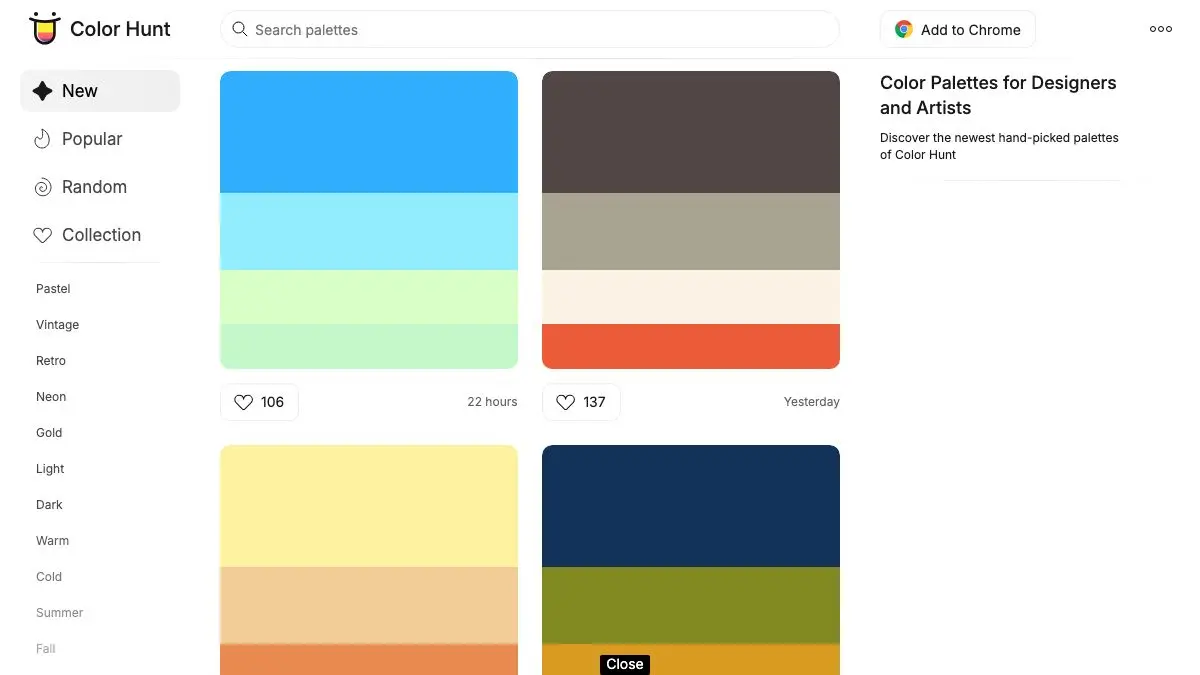
Color Hunt is a wall of four-color palettes, refreshed every day, and clicking a color copies its hex code. That is the entire product. There is no onboarding, no generator to configure, no color-wheel theory to absorb first. You scroll until something looks right and you take it.
For a certain kind of task, picking colors for a slide deck, a side project, a chart, a landing page you are building at eleven at night, this is exactly the right amount of tool.
What is Color Hunt?
Color Hunt started in 2015 as a small side project by Gal Shir, a designer who wanted a place to keep palettes he liked. It grew into one of the most-visited color resources on the web, largely by refusing to become anything more complicated.
The format is fixed and that is the point. Every palette is exactly four colors, shown as four stacked blocks. Four is enough for a background, a surface, a text color and an accent, which happens to cover the majority of small design decisions. It is also few enough that you can evaluate a palette in about a second, which is why scrolling the grid works at all.
Palettes are user-submitted and then filtered. That curation layer is the difference between Color Hunt and a randomly generated color feed: the collection has a house taste, warm neutrals, confident accents, a lot of palettes that read as “modern and calm”, and you learn to trust it.
The organization is deliberately loose. Palettes are tagged with descriptive collections, pastel, vintage, retro, neon, gold, dark, warm, cold, and you can sort by new, popular or random. That is the whole navigation system.
There is also a quiet secondary use for the site: it is a very efficient way to develop taste. Scroll a few hundred palettes and you start noticing why some combinations feel expensive and others feel like a 2006 template. Nobody explains it to you. You just absorb it.
What can you do with Color Hunt?
- Copy a hex code in one click. Click any block in a palette and the code is on your clipboard. No modal, no export step.
- Filter by collection. Pastel, vintage, retro, neon, dark, warm, cold and more. The tags are broad but they narrow a huge grid down fast.
- Sort by new, popular or random. New for what landed this week, popular for the reliably good stuff, random for when you have no idea what you want.
- Save favorites. A free account gives you a personal collection so the palette you liked on Tuesday is still there on Friday.
- Submit your own palettes. Anyone can propose one; the curation queue decides what gets published.
- Use it as a daily feed. New palettes go up every day, which makes it a reasonable thing to open when you need a small aesthetic reset.
Tips to get the most out of it
Pick the palette before you start designing, not after. Color Hunt is most useful as a constraint. Choosing four colors up front and refusing to add a fifth will improve almost any quick project more than an extra hour of fiddling would.
Treat the four colors as roles, not equals. The usual mapping is: lightest as background, darkest as text, one mid-tone as surfaces, and the most saturated one as the accent, used sparingly. Splitting them evenly across a layout is what makes a good palette look loud.
Check contrast before you commit. The palettes are chosen to look good together, which is not the same as being readable. Run your text and background pair through a contrast checker before building anything anyone has to read.
Use the collections as a mood shortcut. “Vintage” and “pastel” and “neon” are doing a lot of work as search terms. If you know the feeling you want but not the colors, start from the tag rather than the front page.
Steal the ratio, not just the values. If a palette looks great on the site, note how much area each color occupies in your layout. A palette that fails often fails because the accent got used for a whole panel.
Keep a saved shortlist. Three or four palettes you return to will serve you better across projects than a fresh hunt every time, and it quietly gives your work a consistent look.
If you like Color Hunt, also try…
- Coolors: the generator side of the same problem, with locking, tweaking and export.
- Behance: see how working designers actually deploy color across a full project.
- Unsplash: free photography that pairs well with a palette you have already chosen.
- Artvee: old paintings are an outstanding and underused source of color schemes.
More tools for making things look right in Design & Creativity.
Frequently asked questions
What is Color Hunt?
Color Hunt is a website that publishes curated four-color palettes, with new ones added daily. Each palette is shown as four stacked blocks, and clicking any block copies its hex code to your clipboard. Palettes are submitted by users and filtered before publication, so the collection is curated rather than automatically generated.
Is Color Hunt free?
Yes, browsing and copying palettes is completely free and requires no account. Creating a free account only adds the ability to save favorites and submit your own palettes.
How do I copy a color from Color Hunt?
Hover over a palette and click the individual color block you want. The hex code is copied to your clipboard immediately, and a small confirmation appears. There is no export dialog or download step.
What is the difference between Color Hunt and Coolors?
Coolors is a generator: it produces palettes on demand and gives you controls to lock, shift and fine-tune each color. Color Hunt is a curated feed: it shows you palettes other people made and someone approved. Use Coolors when you want to build something, and Color Hunt when you want to pick something.