// 2026-08-14 · Productivity · by Bob Smith
draw.io: The Diagram Editor That Never Sees Your Diagrams
draw.io is a full-strength diagramming tool that is free forever, needs no account, is Apache-licensed, and saves your work to your own disk or cloud drive rather than to its own servers.
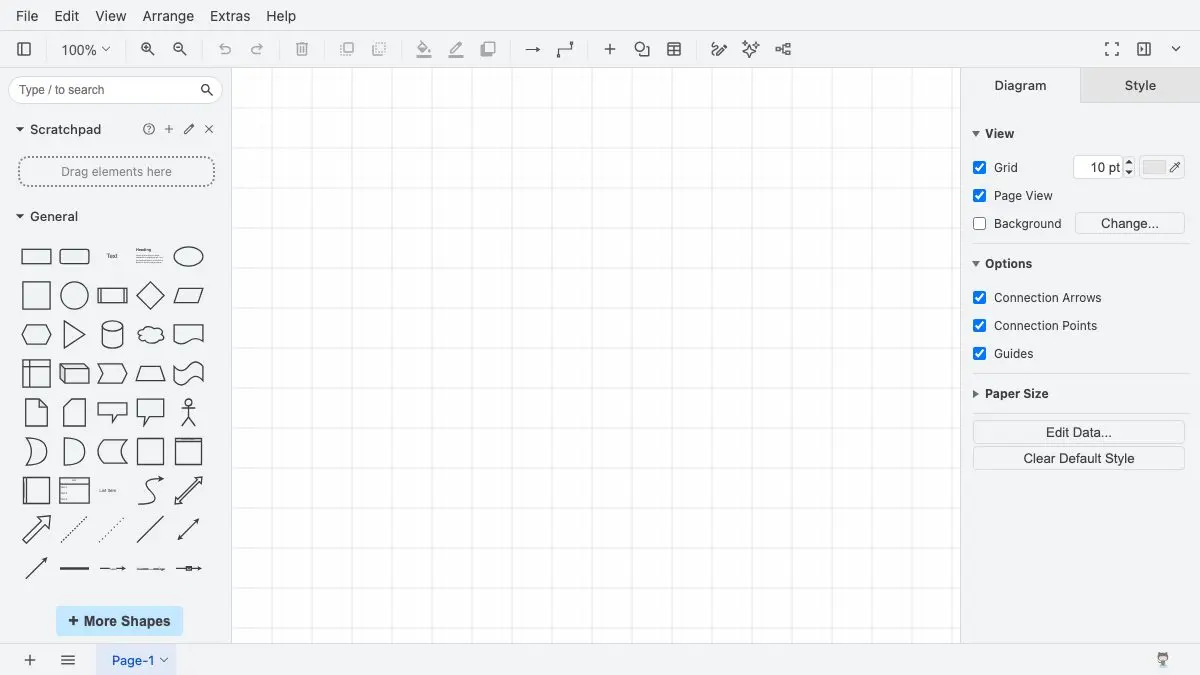
Most diagramming tools want three things from you before you can draw a rectangle: an email address, a workspace name, and eventually a card. draw.io wants none of them. You open the page, it asks where you would like to keep your files, and then you are looking at a canvas and a shape palette.
That opening question is the whole philosophy in one dialog. draw.io is not offering to store your work. It is asking which of your own drives it should write to.
What you get after that is not a stripped-back freebie either. It is a serious diagram editor — UML, network topologies, floor plans, org charts, AWS architecture — that happens to cost nothing and to have been maintained by the same people for over two decades.
What is draw.io?
draw.io is a browser-based diagramming application, also distributed as a desktop app, made by a small British company. Its lineage runs a long way back: Gaudenz Alder began the JGraph diagramming library in 2000 as part of a master’s thesis at ETH Zurich, released the mxGraph JavaScript library in 2006, and put a web editor on top of it in 2011 under the name Diagramly. That became draw.io in 2012, and in February 2020 the app moved to the diagrams.net domain — a precautionary move, the company said, after a security incident involving the .io top-level domain. Both names are still used for the same thing.
The whole editor is open source under the Apache 2.0 licence, which is unusual for something this polished, and it means the app can be self-hosted or embedded in other products. That is exactly what has happened: the draw.io editor turns up inside Confluence, Jira, Notion, Nextcloud, MediaWiki and a widely used VS Code extension.
The part people notice second is the shape situation. The default palette covers general shapes, flowchart, UML, entity relationship and BPMN, and behind the “More Shapes” button sits a large catalogue of enabled-on-demand libraries: AWS icon sets going back several generations plus the isometric ones, Azure, Google Cloud, IBM, Cisco, Salesforce, Citrix, networking and rack equipment. If your job involves drawing an architecture that a colleague has to recognise at a glance, the official icons are already there.
What can you do with draw.io?
- Draw without an account. No sign-up, no trial clock, no seat limit. The first screen is a storage picker, not a registration form.
- Keep the file where you keep everything else. Local disk, Google Drive, OneDrive, Dropbox, GitHub or GitLab. The diagram is a file you own, in a folder you chose.
- Work fully offline. The desktop app is built to be isolated from the internet apart from its update check, which you can switch off with
--disable-updateor theDRAWIO_DISABLE_UPDATEenvironment variable. - Turn on the icon set you need. More Shapes exposes cloud, network, rack, mockup and industry libraries; enable a few, ignore the rest.
- Paste in Mermaid and get real shapes. Arrange > Insert > Mermaid takes text-defined diagrams and lays them out as editable draw.io shapes, keeping the source attached so you can re-edit and regenerate.
- Save one file that is both image and document.
.drawio.pngand.drawio.svgrender as ordinary images anywhere while remaining fully editable when dropped back on the canvas. - Edit diagrams inside your editor. The VS Code extension opens
.drawio,.dio,.drawio.svgand.drawio.pngfiles in the real editor, and lets you flip to the underlying XML in a synchronised view. - Export properly. SVG, PNG, JPEG, PDF and embeddable HTML, with the underlying format being plain XML that survives diffing and source control.
Tips to get the most out of it
- Choose the storage deliberately on day one. Everything downstream — sharing, version history, whether a diagram survives a laptop rebuild — is decided by that first dialog, not by anything draw.io does afterwards.
- Default to
.drawio.pngfor anything you will paste somewhere. It removes the classic failure where the exported image in the wiki is six months older than the source file nobody can find. - Commit
.drawio.svgfiles into repositories. GitHub renders them as images in READMEs with no export step, and the next person can edit them instead of redrawing them. - Use Mermaid for the first draft, draw.io for the final one. Type the structure as text, insert it, then drag things around. You skip the tedious part of laying out twenty boxes by hand.
- Prune the shape panel. Turning off libraries you never use makes the search box far more useful, because it stops returning four versions of the same cloud icon.
- Learn Ctrl/Cmd+Shift+H. Fit page to window is the shortcut you will use hundreds of times once a diagram outgrows the screen.
- Install the desktop app for anything sensitive. Same editor, no browser, no network, and an easy answer when someone asks where the architecture diagram was drawn.
- Remember the PDF caveat. PDF export is the one path that sends your diagram to a server for conversion. Export SVG or PNG instead if that matters to you.
If you like draw.io, also try…
- Excalidraw: the opposite temperament — an infinite canvas where everything comes out hand-drawn, better for thinking out loud than for the diagram that goes in the documentation.
- Mermaid Live Editor: diagrams defined purely as text, with the layout done for you. Faster to write, less control over the result, and the source of the Mermaid you can paste into draw.io.
- CryptPad: the same instinct applied to documents and spreadsheets — real editing, encrypted, with no interest in owning your files.
- Cheatography: for the moment you want a printed one-pager instead of a canvas.
Browse more things worth bookmarking in our Productivity collection.
Frequently asked questions
What is draw.io, and why does it also call itself diagrams.net?
draw.io is a free diagramming application that runs in the browser at app.diagrams.net, with an optional desktop version. It is made by a small British company founded by Gaudenz Alder, whose diagramming work started as a master's thesis project at ETH Zurich in 2000 and became the JGraph library, then the mxGraph JavaScript library in 2006, then a web app called Diagramly in 2011, renamed draw.io in 2012. In February 2020 the app moved to the diagrams.net domain, which the company described as a precautionary response to a security incident affecting the .io top-level domain. The two names refer to the same product and both are still in everyday use — the company itself renamed to draw.io Ltd in 2025 and its main site is drawio.com, while the editor still lives at app.diagrams.net.
Is draw.io free, and do I need an account?
The web app and the desktop app are free with no sign-up step and no premium tier — you open the editor and start drawing. The source is on GitHub under the Apache 2.0 licence, so you can also self-host it or run it inside your own network. The paid parts are the integrations sold through other companies' marketplaces: the draw.io apps for Atlassian Confluence and Jira are licensed separately, with a free tier for instances of ten users or fewer and per-user pricing above that. Nothing about the standalone editor is gated behind those.
Where are my diagrams stored, and can draw.io see them?
You choose the storage on first use and can change it whenever you like: your local device, Google Drive, OneDrive, Dropbox, GitHub or GitLab. draw.io does not offer storage of its own. The company's position is that diagram data lives in your browser while you are editing and is written straight to the destination you picked, never to their servers. The documented exception is PDF export, which sends the diagram for server-side conversion and deletes it as soon as the file is delivered; crash reports contain the line of code that failed but no diagram content. There is no account to delete because there was never an account.
What is a .drawio.png file and why would I use one?
It is a genuine PNG image with the diagram's source XML tucked inside it, so the same single file works as a picture everywhere and as an editable document in draw.io. Create one with File > Save As and pick Editable Bitmap Image (.png), or File > Export As > PNG with 'Include a copy of my diagram' ticked. There is a .drawio.svg equivalent that behaves the same way. The practical win is that you stop maintaining two files that drift apart: the image in your README, wiki page or slide deck is the diagram, and anyone who wants to change it drags it onto the draw.io canvas and carries on editing.