// 2026-08-05 · Tools & Utilities · by Bob Smith
RegExr: The Regex Playground That Explains Itself
RegExr lets you build and test regular expressions with live match highlighting, a token-by-token explanation panel and a searchable community pattern library.
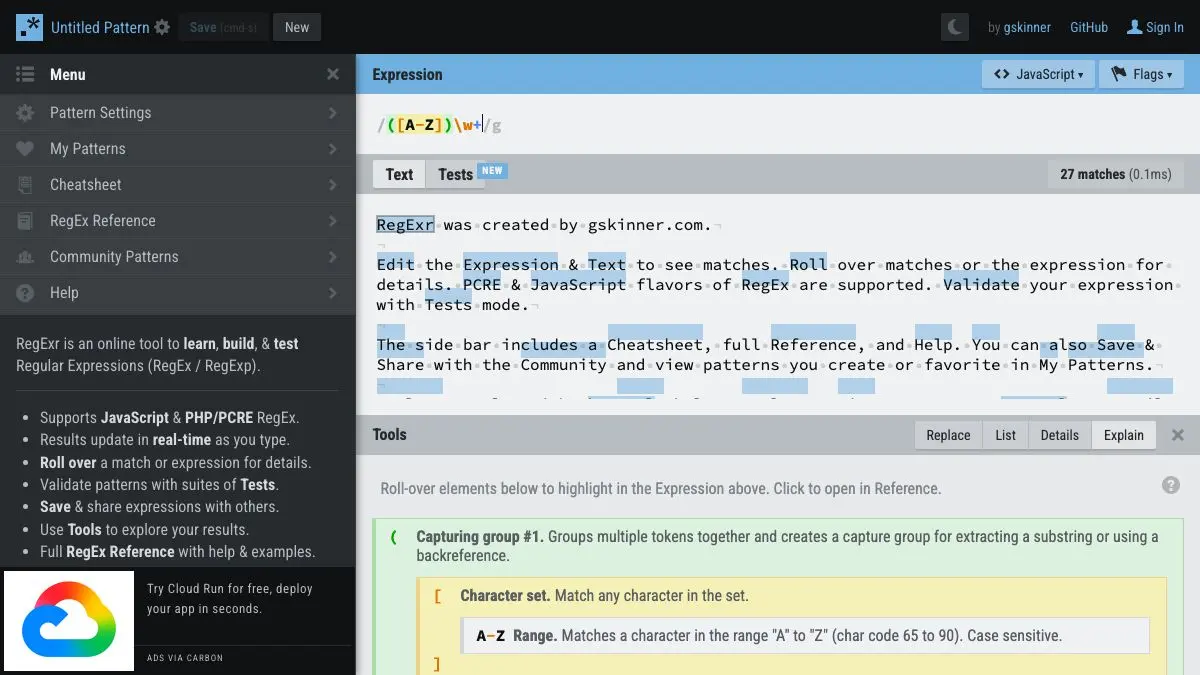
RegExr is where you go when you have written a regular expression, it does not work, and you cannot tell why. Paste the pattern in the top field, paste your text below it, and matches light up as you type. A panel on the side takes the pattern apart token by token and tells you in English what each piece is doing.
It is the difference between debugging regex by guessing and debugging regex by looking.
What is RegExr?
Regular expressions have a deserved reputation as the most write-only syntax in common use. A pattern you wrote six months ago is indistinguishable from line noise. A pattern you wrote six minutes ago that matches almost the right thing is worse, because you have to work out which of the fourteen characters is the guilty one.
RegExr, originally built by Grant Skinner, attacks that problem with immediate feedback. The layout is three regions: the expression at the top, your test text in the middle, and a set of tabs at the bottom for explanation, match details, the cheatsheet and the community library.
Every keystroke re-runs the match. Matched substrings highlight in the test text, capture groups get their own coloring, and the Details tab shows exactly what each group captured for a given match. When you hover over part of your pattern, RegExr shows you which part of the text it is responsible for. That mapping between pattern and result is the thing that actually teaches regex, and static documentation cannot do it.
The Explain tab is the other half. It decomposes the expression into a labeled tree: this is a character class, this is a lazy quantifier, this is a non-capturing group, this backreference points at group two. Reading that once for a pattern you inherited from a colleague is faster than any amount of squinting.
Then there is the community library, a large searchable collection of user-submitted patterns for the usual suspects, emails, URLs, dates, IP addresses, phone numbers, plus a long tail of specific ones. Treat these as starting points rather than gospel. Half the famous email regexes on the internet are subtly wrong, and the well-known ones are wrong in famous ways.
RegExr supports JavaScript and PCRE flavors, which covers a large share of practical use. It is free, needs no account for the core workflow, and the source is on GitHub.
What can you do with RegExr?
- Test a pattern against real text. Paste in an actual sample of the data you are parsing, not a simplified version, and watch what matches.
- Read an explanation of any expression. The Explain panel turns an inherited pattern into something you can reason about in under a minute.
- Inspect capture groups. The Details tab lists every match with its groups broken out, so you can confirm that group three is really what you think it is.
- Toggle flags visually. Global, case-insensitive, multiline, dotall and the rest are checkboxes, which removes an entire category of confusing bug.
- Search the community library. Thousands of shared patterns, searchable by keyword, useful as reference and as a source of tricks.
- Consult the built-in cheatsheet. Every token, quantifier, class and assertion with a one-line description, in the same window as your work.
- Save and share your work. Patterns get a URL, which is the fastest way to ask a colleague why your lookahead is misbehaving.
Tips to get the most out of it
Set the flavor before you debug. JavaScript and PCRE differ on lookbehind, named groups, unicode handling and more. Debugging a pattern in the wrong flavor produces confident, wrong answers.
Paste ugly real data. The bugs live in the edge cases: the row with the trailing space, the entry with the unicode dash, the empty field. A clean test string will pass a pattern that fails in production.
Build the pattern incrementally. Match one small piece, confirm it highlights correctly, then add the next piece. Writing forty characters and then asking why nothing matches is how the afternoon disappears.
Watch for greedy quantifiers first. When a pattern matches far more than intended, .* is the culprit roughly nine times out of ten. Try the lazy form .*? and see if the highlighting collapses to what you wanted.
Use the Explain panel on other people’s regex. It is a genuinely good learning loop: find a clever pattern in the community library, read the explanation, and you have picked up a technique.
Verify anywhere else before shipping. RegExr is a workbench, not a production environment. Once the pattern looks right, run it in the actual language and runtime you are targeting, especially for anything touching validation or security.
If you like RegExr, also try…
- regex101: the other great regex workbench, with more flavors and a step-by-step debugger.
- Learn X in Y Minutes: the same “just show me the syntax” energy applied to entire programming languages.
- Cheatography: thousands of reference cards for the things you look up over and over.
- SQL Murder Mystery: learning a query language by using it on something that is actually interesting.
More things that live permanently in a developer’s tab bar over in Tools & Utilities and Learning & Education.
Frequently asked questions
What is RegExr?
RegExr is a browser-based tool for creating, testing and learning regular expressions. You type a pattern in one field and sample text in another, and it highlights matches live while a side panel explains what each part of the pattern does. It supports JavaScript and PCRE flavors.
Is RegExr free?
Yes. RegExr is free to use with no account required, and the source code is available on GitHub under an open license. Creating an account is optional and only needed if you want to save patterns to your own profile.
What regex flavors does RegExr support?
It handles JavaScript and PCRE, which between them cover most of what people write day to day. Regex syntax differs meaningfully between engines, so if you are targeting Python, Go or a database, verify the final pattern in that environment before relying on it.
Can RegExr explain an existing regular expression?
Yes, and that is one of its best uses. Paste any pattern into the expression field and the Explain panel breaks it into tokens with a plain-English description of each. Hovering over a piece of the pattern highlights the corresponding part of the match.