// 2026-09-08 · Tools & Utilities · by Bob Smith
crontab.guru: The Cron Expression Editor That Reads Your Schedule Back to You
crontab.guru turns five cryptic asterisks into a plain English sentence as you type, shows the next run times, and keeps a library of ready-made expressions for every schedule you are likely to need.
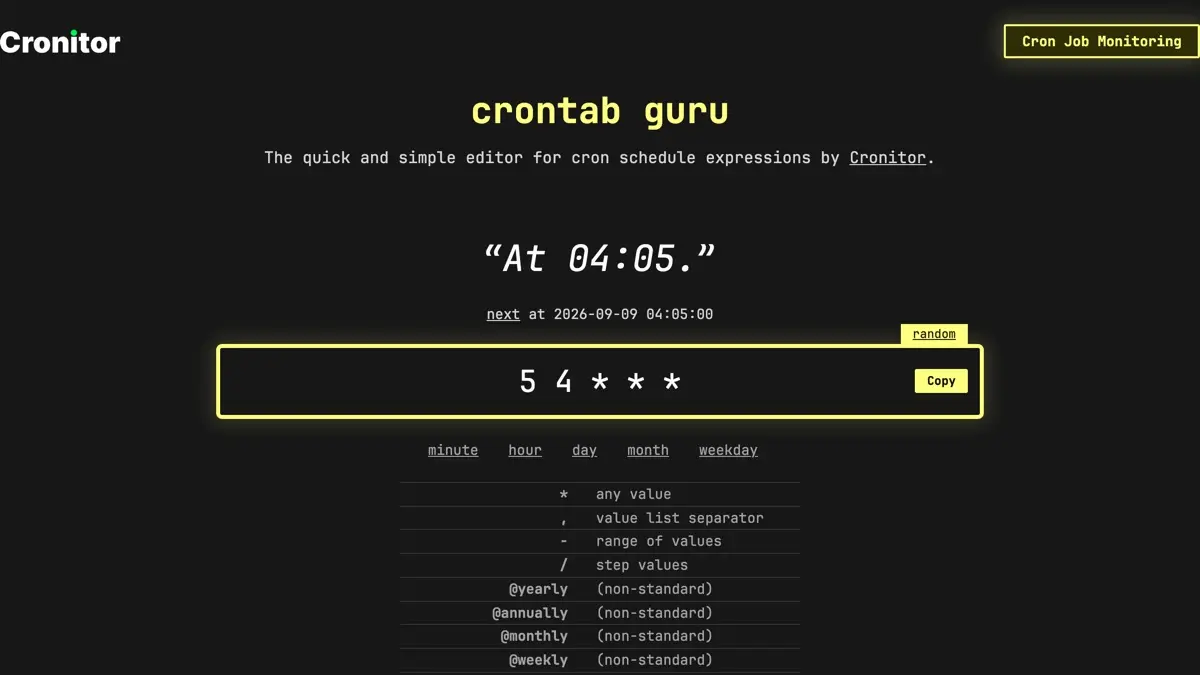
crontab.guru does one thing. You type a cron expression into a box, and it tells you in English what that expression actually means, while you are still typing it.
That sounds trivially small. It has also quietly saved an enormous number of production jobs from running every minute of the fourth hour instead of once at 04:05.
What is crontab.guru?
Cron syntax is five fields of pure positional meaning: minute, hour, day of month, month, day of week. Nothing on the line tells you which is which. 5 4 * * * and 4 5 * * * look equally plausible, are both valid, and mean different things — and you usually find out which you wrote when the job either fires at the wrong time or does not fire at all.
crontab.guru sits between writing the line and finding out. Type 5 4 * * * and above the box it says “At 04:05.” Below it, the next actual timestamp the job would fire. Change one character and both update instantly.
It is built by Cronitor, who sell cron job monitoring, and the editor is the free front door to that business. There is a Cronitor banner on the page. That is the entire price: no account, no signup, no rate limit, no cookie wall.
Underneath the editor sit reference tables for all five fields — tabs for minute, hour, day, month and weekday — plus the non-standard shorthand strings @yearly, @annually, @monthly, @weekly, @daily, @hourly and @reboot, which most but not all cron daemons accept.
And then there is the part people underuse: the examples library. It is the tool running backwards. Instead of writing an expression and asking what it means, you scan a list written in plain English — every 5 minutes, every even minute, every 15 minutes, every day at 2am — and click through to the expression that does it. Every entry is its own page, so crontab.guru/every-5-minutes is a real URL you can link a colleague to.
What can you do on crontab.guru?
- Decode an expression you inherited. Paste the line from someone else’s crontab and read what it does before you touch it. This is the tool’s best use and it takes four seconds.
- Check the next run times. The translation tells you the rule; the next timestamp tells you whether the rule matches what you meant. Both wrong-hour and wrong-timezone assumptions tend to show up here.
- Work backwards from words. Open the examples library, find the schedule you want in English, take the expression.
- Hit random. It loads an arbitrary valid expression. Genuinely useful for learning the syntax by reading rather than writing — you see forms you would never have typed yourself.
- Copy and share. The copy button takes the expression; the URL hash carries it.
crontab.guru/#*/15_*_*_*_*is a link that explains itself. - Grab the self-hosted dashboard. Separately from the editor, the team ships a free open source control panel for the cron jobs on your own machines, installed with a one-line shell script from the site.
Tips to get the most out of it
Read the next-run line, not just the sentence. The English translation confirms your syntax parses the way you think. The timestamp confirms it fires when you think. These fail independently, and the second one catches the timezone mistakes the first cannot.
Watch out for day-of-month plus day-of-week. If you fill in both field 3 and field 5, standard cron treats them as OR, not AND — the job runs on either match. 0 0 13 * 5 is not “Friday the 13th”, it is every 13th and every Friday. crontab.guru will describe this honestly. Believe the description over your intuition.
Paste the URL, not the expression, into code review. A reviewer looking at */7 * * * * has to think. A reviewer clicking a crontab.guru link is told, in words, that this runs every seventh minute — including the ragged jump from minute 56 to minute 0, which is the thing step values quietly do at the end of every hour.
Use it to check the boring end of the range. Step values, ranges crossing midnight, and anything involving the 29th to 31st of a month are where expressions go wrong. Type the edge case and read the next few run times before deploying.
Remember cron’s environment is not your shell. The tool validates your schedule, not your job. A correct expression still fails if the command relies on a PATH or environment variables your login shell has and cron does not — the classic cause of a job that “never runs” while the schedule is perfect. Use absolute paths.
If you like crontab.guru, also try…
- regex101: the same idea aimed at regular expressions — write a pattern, get it explained token by token before it reaches production.
- RegExr: a lighter, more visual take on the same problem, with a community pattern library.
- CyberChef: the “cyber Swiss army knife” for encoding, decoding, and transforming data in a drag-and-drop pipeline.
- Cheatography: thousands of printable reference cards, including several for cron and the shell around it.
More things that do one job properly live in Tools & Utilities, and if you would rather learn the underlying ideas than look them up, try Learning & Education.
Elsewhere
One more worth having open in another tab: the vue-api-query discussions board, where questions about querying and scheduling API resources get worked through in public.
Frequently asked questions
What is crontab.guru?
crontab.guru is a free browser tool that translates cron schedule expressions into plain English. You type something like 5 4 * * * and it answers "At 04:05." underneath, along with the exact timestamp of the next run. It also works in reverse via its examples library, where you pick the schedule you want in words and it hands you the expression. It is built and maintained by Cronitor, a cron job monitoring service.
Is crontab.guru free? Do I need an account?
Yes, it is free, and there is no account, no signup and no paywall. The editor, the next-run preview, the field reference tables and the whole examples library are open to anyone who loads the page. Cronitor, the paid monitoring product from the same team, is advertised on the page but is entirely separate from the editor.
How do I read a cron expression?
A standard cron line has five fields in this order: minute, hour, day of month, month, and day of week. An asterisk means "every value" for that field, a comma separates a list, a hyphen gives a range, and a slash sets a step, so */15 in the minute field means every fifteenth minute. crontab.guru shows a reference table for each of the five fields underneath the editor, and translates whatever you type as you type it.
What are @daily, @hourly and @reboot?
They are non-standard shorthand strings that many cron implementations accept in place of the five fields. @yearly and @annually run once a year, @monthly once a month, @weekly once a week, @daily and @midnight once a day at midnight, @hourly at the top of every hour, and @reboot once when the machine starts. They are convenient but not universal, so check that your cron daemon supports them before relying on one.
Can I share a cron expression from crontab.guru?
Yes. The expression lives in the page URL as a hash, so crontab.guru/#5_4_*_*_* opens the editor with that schedule already loaded and explained. Paste that link into a pull request or a ticket and whoever opens it sees the English translation rather than five asterisks they have to decode themselves.
What is the Crontab Guru dashboard?
It is a separate free, open source, self-hosted control panel for the cron jobs on your own machines, installed with a shell one-liner from the site. It is distinct from the editor, which needs nothing installed at all, and distinct from Cronitor, which is the paid hosted monitoring product.